


Alienware Gaming Monitors
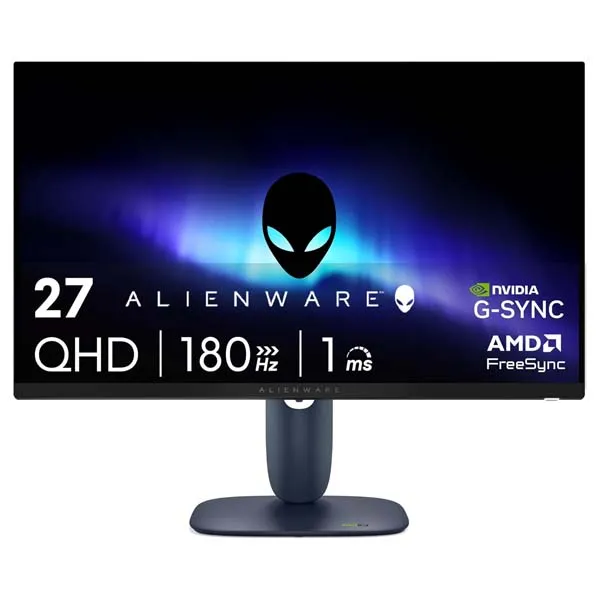
Alienware AW2725DM 27-Inch QHD 180Hz Gaming Monitor
Enjoy detailed QHD visuals, smooth 180Hz gameplay, vivid colour and responsive Fast IPS performance in a sleek Alienware gaming display.
Smooth Gaming with Sharp QHD Detail
The Alienware AW2725DM features a 27-inch Fast IPS display with a native resolution of 2560 × 1440. QHD delivers more detail than Full HD, while the 16:9 aspect ratio suits a wide range of games, applications and everyday tasks.
With a refresh rate of up to 180Hz over DisplayPort, response options down to 1ms grey-to-grey in Extreme mode, and support for NVIDIA G-SYNC Compatible, AMD FreeSync and VESA AdaptiveSync, this monitor is built for responsive gaming. VESA DisplayHDR 400 certification and 95% DCI-P3 colour coverage add extra vibrancy to compatible content.
Key Features
27-Inch QHD Display
Enjoy 2560 × 1440 resolution for crisp game environments, detailed images and a spacious desktop.
180Hz Refresh Rate
Experience smooth motion and responsive gameplay with a maximum 180Hz refresh rate via DisplayPort.
Fast IPS Technology
Benefit from wide viewing angles, vivid colours and responsive pixel transitions for gaming and general use.
Up to 1ms Response
Select Extreme response mode for a specified 1ms grey-to-grey response time in supported settings.
VESA DisplayHDR 400
HDR certification and 400 cd/m² rated brightness help compatible content deliver more vivid highlights.
Adaptive Sync Support
NVIDIA G-SYNC Compatible, AMD FreeSync and VESA AdaptiveSync help reduce tearing with compatible systems.
Responsive Performance for Competitive Gaming
The AW2725DM combines a 180Hz maximum refresh rate with Fast IPS technology for fluid motion and responsive control. Its selectable 1ms Extreme, 2ms Super Fast and 4ms Fast grey-to-grey response modes let you choose the response setting that suits your preferences.
Adaptive-sync support helps synchronise the display with compatible graphics hardware, reducing tearing and stutter. For the maximum 180Hz refresh rate at native QHD resolution, use DisplayPort 1.4 with a compatible PC and graphics card. HDMI supports up to 144Hz at native resolution according to Dell's specifications.
Vivid Colour and HDR Visuals
The Fast IPS panel combines 178° horizontal and vertical viewing angles with 95% DCI-P3 colour coverage. It supports up to 1.07 billion colours, helping compatible games, video and creative content appear vibrant and detailed.
VESA DisplayHDR 400 certification supports HDR playback for compatible content, while the 400 cd/m² rated brightness helps produce clear, bright images. The anti-glare screen coating helps manage reflections in typical desktop environments.
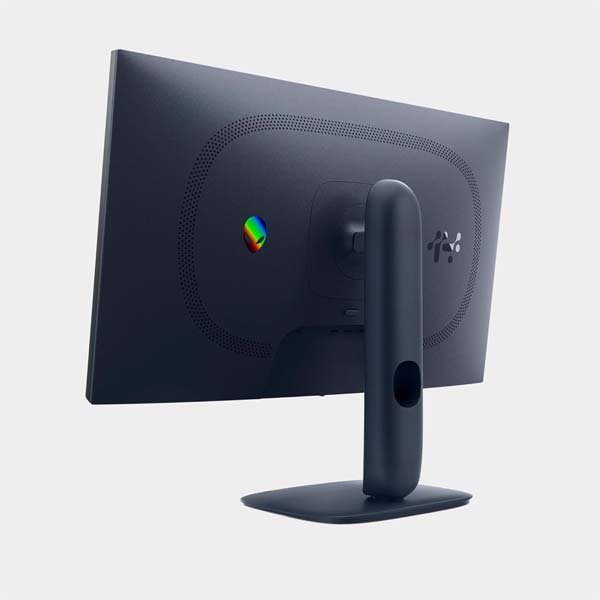
Dell ComfortView Plus and low-blue-light features are designed to support more comfortable viewing. The adjustable stand provides height, tilt, swivel and pivot adjustments to help you find a suitable position.
Technical Specifications
Alienware AW2725DM — display, gaming performance, connectivity and ergonomics.
| Display | |
|---|---|
| Model | Alienware AW2725DM |
| Screen size | 27 inches (68.58 cm) |
| Panel technology | Fast IPS with LED edgelight backlight |
| Resolution | 2560 × 1440 (QHD / WQHD) |
| Aspect ratio | 16:9 |
| Screen type | Flat panel, anti-glare coating |
| Refresh rate | Up to 180Hz via DisplayPort; up to 144Hz via HDMI at native QHD resolution |
| Response time options | 1ms GTG Extreme, 2ms GTG Super Fast, 4ms GTG Fast |
| Pixel pitch | 0.2331 × 0.2331 mm |
| Pixel density | 109 PPI |
| Brightness | 400 cd/m² |
| Contrast ratio | 1000:1 typical |
| HDR certification | VESA DisplayHDR 400 |
| Colour gamut | 95% DCI-P3 (CIE 1976) |
| Colour support | 1.07 billion colours |
| Viewing angles | 178° horizontal / 178° vertical |
| Gaming and Comfort Features | |
| Adaptive sync | NVIDIA G-SYNC Compatible, AMD FreeSync, VESA AdaptiveSync |
| HDR support | VESA DisplayHDR 400 |
| Eye comfort | ComfortView Plus, low-blue-light technology |
| Display functions | Picture-in-Picture (PiP), Picture-by-Picture (PbP) |
| Other features | Narrow bezel, security lock slot, cable lock slot |
| Connectivity | |
| DisplayPort | 1 × DisplayPort 1.4 |
| HDMI | 2 × HDMI inputs; QHD up to 144Hz, HDR and VRR supported as specified |
| USB upstream | 1 × USB 5Gbps Type-B upstream port |
| USB Type-A | 2 × USB 5Gbps downstream ports; one supports BC 1.2 charging |
| Audio | No built-in speakers listed |
| Ergonomics and Physical Details | |
| Stand adjustments | Height, tilt, swivel and pivot |
| Height adjustment | Up to 110mm |
| Tilt range | -5° to +21° |
| Swivel range | -20° to +20° |
| Pivot range | -90° to +90° |
| Mounting | VESA-compatible mounting; check the user manual for the required bracket dimensions |
| Power supply | 100–240V AC input |
Specifications are based on Dell's published product information and may vary by region or revision. Confirm the product listing and user manual for the latest details and included accessories.
Who Is the Alienware AW2725DM For?
Competitive Gaming
The 180Hz refresh rate and fast response options suit players looking for smooth, responsive gameplay.
AAA and Open-World Games
QHD resolution, vivid colour and HDR support help compatible games deliver detailed environments.
Everyday Productivity
A 27-inch QHD workspace gives you room for documents, browsing, communication and everyday applications.
Streaming and Media
Wide viewing angles, HDR support and a 95% DCI-P3 gamut make it a versatile display for supported media.
Before You Buy
- For up to 180Hz at native QHD resolution, connect through DisplayPort 1.4 with compatible hardware.
- HDMI supports up to 144Hz at native QHD resolution according to Dell's published specifications.
- The 1ms response time is available in Extreme mode; Fast and Super Fast modes have different specified response times.
- HDR effects depend on the source content, application settings and compatible hardware.
- The monitor does not list built-in speakers. Arrange external audio if sound output is required.
- Confirm regional availability, warranty coverage, included cables and current pricing before ordering.
Frequently Asked Questions
What resolution does the Alienware AW2725DM support?
It supports native QHD resolution of 2560 × 1440 with a 16:9 aspect ratio.
What is the maximum refresh rate?
The monitor supports up to 180Hz via DisplayPort 1.4 and up to 144Hz via HDMI at native QHD resolution, subject to the connection and configuration.
Does the AW2725DM support NVIDIA G-SYNC?
Yes. It is NVIDIA G-SYNC Compatible and also supports AMD FreeSync and VESA AdaptiveSync.
What does the 1ms response time mean?
The specified 1ms grey-to-grey response time is available in Extreme mode. The monitor also provides 2ms Super Fast and 4ms Fast response settings.
Does the monitor support HDR?
Yes. It carries VESA DisplayHDR 400 certification and has a rated brightness of 400 cd/m².
Can I adjust the monitor's position?
Yes. The included stand supports height adjustment up to 110mm, tilt, swivel and pivot adjustments.
Does the AW2725DM have built-in speakers?
Dell's published specifications do not list built-in speakers. Use external speakers or headphones if you need audio output.
Upgrade Your Gaming Experience with Clarion Computers
Explore gaming hardware and create a setup around the Alienware AW2725DM's sharp QHD display, smooth 180Hz performance and vivid Fast IPS visuals.
Explore Clarion Computers