
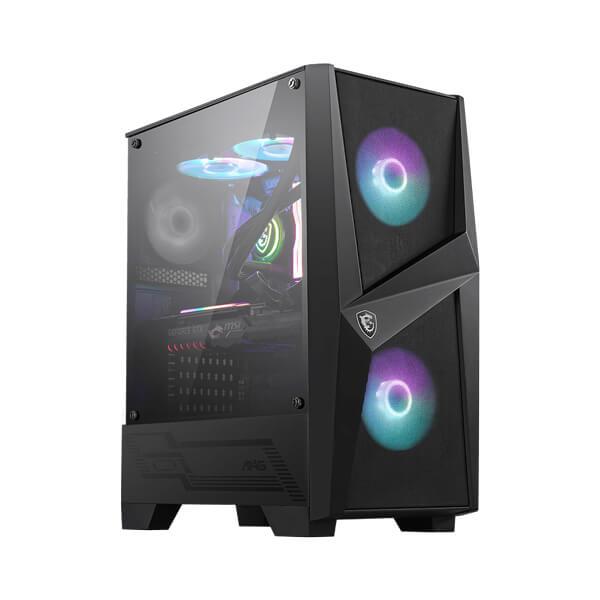


MSI MAG GAMING SERIES
MSI MAG FORGE 100R ARGB Mid-Tower Gaming Cabinet
Build a gaming PC with customizable ARGB lighting, optimized airflow, a tempered-glass side panel and flexible cooling support in a stylish mid-tower chassis.
Key Highlights of MSI MAG FORGE 100R
Customizable ARGB Lighting
Two front 120mm ARGB fans and an included lighting control board let you personalize your gaming setup.
Tempered-Glass Side Panel
The 4mm tempered-glass panel showcases your components and internal lighting.
Flexible Cooling Support
Supports up to six case fans and radiators up to 240mm at supported mounting positions.
Spacious Component Support
Accommodates ATX motherboards, graphics cards up to 330mm and CPU coolers up to 160mm tall.
Introduction to MSI MAG FORGE 100R ARGB Cabinet
The MSI MAG FORGE 100R is a mid-tower PC cabinet designed for gamers and PC builders who want a balance of attractive styling, airflow and practical component compatibility. Its front design works with the included ARGB fans to create a distinctive gaming aesthetic, while the tempered-glass side panel makes it easy to display your hardware and lighting setup.
The cabinet supports ATX, Micro-ATX and Mini-ITX motherboards, giving builders flexibility when choosing a platform. Graphics cards up to 330mm and CPU air coolers up to 160mm can be accommodated, subject to the dimensions of other installed components and the selected cooling configuration.
With three pre-installed fans, multiple additional fan mounting positions, radiator support and a top magnetic dust filter, the MAG FORGE 100R provides a versatile foundation for gaming, home and performance-oriented PC builds.
Features and Technologies
Customizable ARGB Lighting
Two front 120mm addressable RGB fans provide colorful lighting for your gaming rig. The integrated ARGB controller offers preset effects, with supported motherboard synchronization available for compatible systems.
4mm Tempered-Glass Side Panel
The tempered-glass side panel gives you a clear view of internal components, cooling hardware and RGB lighting. Its design helps showcase a carefully assembled PC build.
Optimized Airflow
Two front intake fans help draw cool air into the enclosure, while the included rear fan helps exhaust warm air. Additional supported fan positions allow builders to tailor airflow to their hardware.
Three Pre-Installed Fans
The case includes two 120mm front ARGB fans and one 120mm rear system fan, providing a starting cooling configuration without requiring an immediate full set of additional case fans.
Flexible Fan and Radiator Mounting
Install additional fans at supported front, top and rear positions. The chassis supports radiators up to 240mm at the front or top, and up to 120mm at the rear.
Magnetic Top Dust Filter
The removable magnetic filter over the top ventilation area helps reduce dust entering through the vent and makes routine cleaning more convenient.
Broad Motherboard Compatibility
Support for ATX, Micro-ATX and Mini-ITX motherboards lets you build different system sizes while retaining the convenience of a mid-tower enclosure.
Dedicated Storage Options
Drive mounting provisions include two 3.5-inch bays compatible with 2.5-inch drives and three dedicated 2.5-inch mounting positions, subject to the case's specified drive layout.
Convenient Front I/O
Two USB 3.2 Gen 1 Type-A ports, a headphone/audio output and a microphone input provide convenient access for compatible peripherals and headsets.
ARGB Customization and Cooling Flexibility
The MAG FORGE 100R combines two front ARGB fans with a dedicated lighting controller, allowing you to change supported lighting effects using the case's LED control button. Compatible motherboard synchronization can provide further customization when connected and configured correctly.
For cooling upgrades, the chassis supports up to six fans across the front, top and rear mounting positions. Front and top radiator support extends to 240mm, while the rear supports a 120mm radiator. Check radiator thickness, fan placement, motherboard clearance and graphics-card dimensions before choosing a liquid-cooling setup.
Technical Specifications of MSI MAG FORGE 100R
General Specifications
MSI MAG FORGE 100R
Mid-Tower
Black
4mm tempered glass
ATX / Micro-ATX / Mini-ITX
7
421 × 210 × 499 mm
17.05 × 8.27 × 19.65 inches
5.64 kg
Cooling and Radiator Support
2 × 120mm ARGB fans
1 × 120mm non-LED system fan
3 × 120mm or 2 × 140mm
2 × 120mm or 2 × 140mm
1 × 120mm
Up to 6 fans, depending on configuration
120 / 140 / 240mm
120 / 240mm
120mm
Magnetic top dust filter
Component Compatibility
330mm
160mm
Standard ATX PSU
200mm without the 3.5-inch HDD cage installed
2 bays, compatible with 2.5-inch drives
3 dedicated mounting positions
Front I/O and Lighting
2 × USB 3.2 Gen 1 Type-A (5Gbps)
1 × HD Audio / headphone output
1 × microphone port
Addressable RGB (ARGB)
Integrated ARGB LED control board and LED switch
Supported with compatible motherboard connection and software
Specifications are based on MSI's published MAG FORGE 100R documentation. Component clearance can vary with fan, radiator, storage and power-supply installation. Verify dimensions and included accessories for the specific retail unit before purchase.
Ideal Use Cases
Gaming PC Builds
Build a gaming system with customizable ARGB lighting, practical component clearance and room for additional case cooling.
Custom RGB Setups
Showcase illuminated fans, compatible motherboard lighting and selected internal components through the tempered-glass side panel.
Performance Workstations
Suitable for compatible productivity systems using ATX, Micro-ATX or Mini-ITX motherboards and supported cooling configurations.
First-Time PC Builders
Three pre-installed fans, standard ATX power-supply support and multiple motherboard options offer a useful starting point for a custom PC.
Cooling Upgrades
Supported fan mounts and up to 240mm radiator compatibility provide options for expanding the cooling setup as system requirements change.
Home and Gaming Desks
A black mid-tower design with customizable lighting suits gaming rooms, home offices and desktop setups.
Before You Buy / Install
- Check that your motherboard is ATX, Micro-ATX or Mini-ITX and that the selected components fit the cabinet's internal layout.
- Confirm that your graphics card is no longer than 330mm and your CPU air cooler is no taller than 160mm.
- Check radiator thickness, fan placement and component clearances before installing a front or top 240mm radiator.
- The maximum PSU length is listed as 200mm when the 3.5-inch HDD cage is removed. Confirm the required PSU and storage layout before assembly.
- For motherboard-controlled ARGB lighting, verify the compatible addressable RGB header and follow MSI's connection instructions. Never connect an ARGB plug to an incompatible RGB header.
- Plan airflow so front fans draw air into the case and exhaust fans help remove warm air. Adjust fan placement to suit your CPU, GPU and radiator configuration.
- Use the magnetic dust filter for routine maintenance and clean the case with the PC powered off.
- Check the current warranty, local availability and exact accessories supplied with your retail package.
Frequently Asked Questions
What type of cabinet is the MSI MAG FORGE 100R?
The MSI MAG FORGE 100R is a mid-tower PC cabinet designed for gaming and general-purpose desktop builds.
Which motherboard sizes are supported?
The cabinet supports ATX, Micro-ATX and Mini-ITX motherboards.
How many fans are included with the MAG FORGE 100R?
It includes three fans: two 120mm ARGB fans at the front and one 120mm non-LED system fan at the rear.
Can I add more fans to this cabinet?
Yes. The case supports up to six fans in total: up to three 120mm or two 140mm fans at the front, up to two 120mm or two 140mm fans at the top, and one 120mm fan at the rear. Actual combinations must follow the available mounting positions.
What radiator sizes are supported?
The MAG FORGE 100R supports radiators up to 240mm at the front and top, and up to 120mm at the rear. Check radiator thickness and clearance with your other components before installation.
What is the maximum supported graphics-card length?
The listed maximum graphics-card length is 330mm. If you install a radiator or additional fans at the front, check the available clearance for your exact graphics-card and cooling combination.
Does the cabinet support ARGB lighting synchronization?
Yes. The included ARGB controller provides lighting effects, and motherboard synchronization is supported when the controller is connected to a compatible motherboard and configured according to MSI's instructions.
How many storage drives can I install?
The listed mounting support includes two 3.5-inch bays compatible with 2.5-inch drives and three dedicated 2.5-inch mounting positions. Confirm the exact drive arrangement required for your build.
What ports are available on the front I/O panel?
The front I/O provides two USB 3.2 Gen 1 Type-A ports, one audio output and one microphone input.
Is a power supply included?
The published chassis specifications list ATX power-supply support but do not list a PSU as an included component. Confirm the contents of the specific retail package before purchase.
Build Your Dream PC with Clarion Computers
Explore PC cabinets, cooling solutions, graphics cards and essential components at Clarion Computers.
<div style="font-family: Arial,Helvetica,sans-serif; margin: 30px 0; color: #222;">
<div style="border: 1px solid #e5e7eb; border-radius: 12px; overflow: hidden;">
<div style="background: linear-gradient(135deg,#111827,#1f2937); padding: 18px 22px;">
<h2 style="margin: 0; font-size: 24px; color: #ffffff;">MSI MAG FORGE 100R ARGB Mid-Tower Gaming Cabinet</h2>
<p style="margin: 6px 0 0; font-size: 14px; color: #d1d5db;">Tempered Glass Gaming Case with Addressable RGB Lighting</p>
</div>
<div style="padding: 22px;">
<h3 style="font-size: 20px; color: #111827; margin: 0 0 12px;">Technical Specifications</h3>
<table style="width: 100%; border-collapse: collapse; font-size: 14px; line-height: 1.6; margin-bottom: 24px;">
<tbody>
<tr style="background: #f3f4f6;"><td style="width: 38%; padding: 10px;"><strong>Model</strong></td><td style="padding: 10px;">MSI MAG FORGE 100R</td></tr>
<tr style="background: #ffffff;"><td style="padding: 10px;"><strong>Product Type</strong></td><td style="padding: 10px;">Mid-Tower PC Cabinet</td></tr>
<tr style="background: #f9fafb;"><td style="padding: 10px;"><strong>Motherboard Support</strong></td><td style="padding: 10px;">ATX, Micro-ATX, Mini-ITX</td></tr>
<tr style="background: #ffffff;"><td style="padding: 10px;"><strong>Side Panel</strong></td><td style="padding: 10px;">4mm tempered glass</td></tr>
<tr style="background: #f3f4f6;"><td style="padding: 10px;"><strong>Pre-Installed Fans</strong></td><td style="padding: 10px;">2 × 120mm front ARGB fans and 1 × 120mm rear system fan</td></tr>
<tr style="background: #ffffff;"><td style="padding: 10px;"><strong>Maximum GPU Length</strong></td><td style="padding: 10px;">330mm</td></tr>
<tr style="background: #f9fafb;"><td style="padding: 10px;"><strong>Maximum CPU Cooler Height</strong></td><td style="padding: 10px;">160mm</td></tr>
<tr style="background: #ffffff;"><td style="padding: 10px;"><strong>Expansion Slots</strong></td><td style="padding: 10px;">7</td></tr>
<tr style="background: #f3f4f6;"><td style="padding: 10px;"><strong>Drive Mount Support</strong></td><td style="padding: 10px;">3 × 2.5-inch drives and 2 × 3.5-inch drives</td></tr>
<tr style="background: #ffffff;"><td style="padding: 10px;"><strong>Power Supply Support</strong></td><td style="padding: 10px;">Standard ATX PSU; maximum length up to 200mm under specified drive-cage configuration</td></tr>
<tr style="background: #f9fafb;"><td style="padding: 10px;"><strong>Dimensions (D × W × H)</strong></td><td style="padding: 10px;">421 × 210 × 499mm</td></tr>
<tr style="background: #ffffff;"><td style="padding: 10px;"><strong>Net Weight</strong></td><td style="padding: 10px;">5.64kg</td></tr>
</tbody>
</table>
<h3 style="font-size: 20px; color: #111827; margin: 0 0 12px;">Features & Technology</h3>
<table style="width: 100%; border-collapse: collapse; font-size: 14px; line-height: 1.6; margin-bottom: 24px;">
<tbody>
<tr style="background: #f3f4f6;"><td style="width: 38%; padding: 10px;"><strong>Addressable RGB Lighting</strong></td><td style="padding: 10px;">Two front ARGB fans with customizable lighting effects</td></tr>
<tr style="background: #ffffff;"><td style="padding: 10px;"><strong>ARGB Control Board</strong></td><td style="padding: 10px;">Included 1-to-6 ARGB LED control board for compatible lighting accessories</td></tr>
<tr style="background: #f9fafb;"><td style="padding: 10px;"><strong>Lighting Control</strong></td><td style="padding: 10px;">Onboard LED switch with multiple lighting effects and compatible motherboard synchronization</td></tr>
<tr style="background: #ffffff;"><td style="padding: 10px;"><strong>Airflow Design</strong></td><td style="padding: 10px;">Mesh-style front airflow design with front intake and rear exhaust fans</td></tr>
<tr style="background: #f3f4f6;"><td style="padding: 10px;"><strong>Tempered Glass</strong></td><td style="padding: 10px;">4mm side panel for viewing the internal components and lighting</td></tr>
<tr style="background: #ffffff;"><td style="padding: 10px;"><strong>Dust Protection</strong></td><td style="padding: 10px;">Magnetic top dust filter for easier cleaning and maintenance</td></tr>
<tr style="background: #f9fafb;"><td style="padding: 10px;"><strong>Cooling Capacity</strong></td><td style="padding: 10px;">Supports up to six system fans across the supported mounting positions</td></tr>
</tbody>
</table>
<h3 style="font-size: 20px; color: #111827; margin: 0 0 12px;">Connectivity</h3>
<table style="width: 100%; border-collapse: collapse; font-size: 14px; line-height: 1.6; margin-bottom: 24px;">
<tbody>
<tr style="background: #f3f4f6;"><td style="width: 38%; padding: 10px;"><strong>USB Ports</strong></td><td style="padding: 10px;">2 × USB 3.2 Gen 1 Type-A (5Gbps)</td></tr>
<tr style="background: #ffffff;"><td style="padding: 10px;"><strong>Audio Output</strong></td><td style="padding: 10px;">1 × Audio-out</td></tr>
<tr style="background: #f9fafb;"><td style="padding: 10px;"><strong>Microphone Input</strong></td><td style="padding: 10px;">1 × Mic-in</td></tr>
<tr style="background: #ffffff;"><td style="padding: 10px;"><strong>LED Control</strong></td><td style="padding: 10px;">Dedicated LED switch button</td></tr>
</tbody>
</table>
<h3 style="font-size: 20px; color: #111827; margin: 0 0 12px;">Design</h3>
<table style="width: 100%; border-collapse: collapse; font-size: 14px; line-height: 1.6; margin-bottom: 24px;">
<tbody>
<tr style="background: #f3f4f6;"><td style="width: 38%; padding: 10px;"><strong>Form Factor</strong></td><td style="padding: 10px;">Mid-Tower</td></tr>
<tr style="background: #ffffff;"><td style="padding: 10px;"><strong>Exterior Style</strong></td><td style="padding: 10px;">Gaming-focused design with front airflow openings and ARGB lighting</td></tr>
<tr style="background: #f9fafb;"><td style="padding: 10px;"><strong>Side Panel</strong></td><td style="padding: 10px;">4mm tempered glass</td></tr>
<tr style="background: #ffffff;"><td style="padding: 10px;"><strong>Lighting</strong></td><td style="padding: 10px;">Addressable RGB lighting on the included front fans</td></tr>
<tr style="background: #f3f4f6;"><td style="padding: 10px;"><strong>Dust Filter</strong></td><td style="padding: 10px;">Magnetic top dust filter</td></tr>
<tr style="background: #ffffff;"><td style="padding: 10px;"><strong>Cable Management</strong></td><td style="padding: 10px;">Internal cable-routing space for a cleaner PC build</td></tr>
</tbody>
</table>
<h3 style="font-size: 20px; color: #111827; margin: 0 0 12px;">Dimensions & Power</h3>
<table style="width: 100%; border-collapse: collapse; font-size: 14px; line-height: 1.6; margin-bottom: 24px;">
<tbody>
<tr style="background: #f3f4f6;"><td style="width: 38%; padding: 10px;"><strong>Dimensions</strong></td><td style="padding: 10px;">421 × 210 × 499mm (D × W × H)</td></tr>
<tr style="background: #ffffff;"><td style="padding: 10px;"><strong>Net Weight</strong></td><td style="padding: 10px;">5.64kg</td></tr>
<tr style="background: #f9fafb;"><td style="padding: 10px;"><strong>PSU Form Factor</strong></td><td style="padding: 10px;">ATX</td></tr>
<tr style="background: #ffffff;"><td style="padding: 10px;"><strong>Maximum PSU Length</strong></td><td style="padding: 10px;">Up to 200mm, depending on drive-cage configuration</td></tr>
<tr style="background: #f3f4f6;"><td style="padding: 10px;"><strong>Maximum GPU Length</strong></td><td style="padding: 10px;">330mm</td></tr>
<tr style="background: #ffffff;"><td style="padding: 10px;"><strong>Maximum CPU Cooler Height</strong></td><td style="padding: 10px;">160mm</td></tr>
<tr style="background: #f9fafb;"><td style="padding: 10px;"><strong>Power Supply Included</strong></td><td style="padding: 10px;">Not listed as included; check the seller's package contents</td></tr>
</tbody>
</table>
<h3 style="font-size: 20px; color: #111827; margin: 0 0 12px;">Recommended Use Cases</h3>
<table style="width: 100%; border-collapse: collapse; font-size: 14px; line-height: 1.6; margin-bottom: 24px;">
<tbody>
<tr style="background: #f3f4f6;"><td style="width: 38%; padding: 10px;"><strong>Gaming PC Builds</strong></td><td style="padding: 10px;">Build a gaming system with dedicated graphics and customizable ARGB lighting.</td></tr>
<tr style="background: #ffffff;"><td style="padding: 10px;"><strong>Custom PC Assembly</strong></td><td style="padding: 10px;">Supports ATX, Micro-ATX and Mini-ITX motherboards for different build configurations.</td></tr>
<tr style="background: #f9fafb;"><td style="padding: 10px;"><strong>RGB Gaming Setups</strong></td><td style="padding: 10px;">Showcase compatible internal components through the tempered-glass side panel.</td></tr>
<tr style="background: #ffffff;"><td style="padding: 10px;"><strong>High-Airflow Builds</strong></td><td style="padding: 10px;">Use the included fans and additional supported fan mounts to improve case ventilation.</td></tr>
<tr style="background: #f3f4f6;"><td style="padding: 10px;"><strong>Creative Workstations</strong></td><td style="padding: 10px;">Suitable for compatible desktop workstations used for editing, design and general productivity.</td></tr>
</tbody>
</table>
<h3 style="font-size: 20px; color: #111827; margin: 0 0 12px;">Frequently Asked Questions</h3>
<div style="margin-bottom: 24px;">
<div style="border: 1px solid #e5e7eb; border-radius: 6px; overflow: hidden; margin-bottom: 10px;">
<div style="background: #1f2937; color: #ffffff; padding: 12px; font-weight: bold; font-size: 14px;">1. Which motherboards are compatible with the MSI MAG FORGE 100R?</div>
<div style="background: #ffffff; padding: 12px; font-size: 14px; line-height: 1.6;">The cabinet supports ATX, Micro-ATX and Mini-ITX motherboards.</div>
</div>
<div style="border: 1px solid #e5e7eb; border-radius: 6px; overflow: hidden; margin-bottom: 10px;">
<div style="background: #1f2937; color: #ffffff; padding: 12px; font-weight: bold; font-size: 14px;">2. How many fans are included?</div>
<div style="background: #ffffff; padding: 12px; font-size: 14px; line-height: 1.6;">It includes two 120mm front ARGB fans and one 120mm rear system fan.</div>
</div>
<div style="border: 1px solid #e5e7eb; border-radius: 6px; overflow: hidden; margin-bottom: 10px;">
<div style="background: #1f2937; color: #ffffff; padding: 12px; font-weight: bold; font-size: 14px;">3. What is the maximum graphics card length?</div>
<div style="background: #ffffff; padding: 12px; font-size: 14px; line-height: 1.6;">The supported maximum graphics card length is 330mm. Check the dimensions of your specific GPU before purchase.</div>
</div>
<div style="border: 1px solid #e5e7eb; border-radius: 6px; overflow: hidden; margin-bottom: 10px;">
<div style="background: #1f2937; color: #ffffff; padding: 12px; font-weight: bold; font-size: 14px;">4. What is the maximum CPU cooler height?</div>
<div style="background: #ffffff; padding: 12px; font-size: 14px; line-height: 1.6;">The cabinet supports CPU air coolers up to 160mm tall.</div>
</div>
<div style="border: 1px solid #e5e7eb; border-radius: 6px; overflow: hidden; margin-bottom: 10px;">
<div style="background: #1f2937; color: #ffffff; padding: 12px; font-weight: bold; font-size: 14px;">5. Which radiator sizes are supported?</div>
<div style="background: #ffffff; padding: 12px; font-size: 14px; line-height: 1.6;">Radiator support is up to 240mm at the front, up to 240mm at the top, and up to 120mm at the rear, subject to component clearance.</div>
</div>
<div style="border: 1px solid #e5e7eb; border-radius: 6px; overflow: hidden; margin-bottom: 10px;">
<div style="background: #1f2937; color: #ffffff; padding: 12px; font-weight: bold; font-size: 14px;">6. Does it have a tempered-glass side panel?</div>
<div style="background: #ffffff; padding: 12px; font-size: 14px; line-height: 1.6;">Yes. It features a 4mm tempered-glass side panel for viewing the components inside the PC.</div>
</div>
<div style="border: 1px solid #e5e7eb; border-radius: 6px; overflow: hidden; margin-bottom: 10px;">
<div style="background: #1f2937; color: #ffffff; padding: 12px; font-weight: bold; font-size: 14px;">7. Can the ARGB lighting be customized?</div>
<div style="background: #ffffff; padding: 12px; font-size: 14px; line-height: 1.6;">Yes. The included lighting control board provides multiple lighting effects, and compatible motherboard synchronization is supported.</div>
</div>
<div style="border: 1px solid #e5e7eb; border-radius: 6px; overflow: hidden;">
<div style="background: #1f2937; color: #ffffff; padding: 12px; font-weight: bold; font-size: 14px;">8. Is a power supply included with the cabinet?</div>
<div style="background: #ffffff; padding: 12px; font-size: 14px; line-height: 1.6;">The official cabinet specifications list ATX power supply compatibility, but do not list a PSU as included. Confirm the package contents with the seller before ordering.</div>
</div>
</div>
<h3 style="font-size: 20px; color: #111827; margin: 0 0 12px;">Before You Buy</h3>
<div style="background: #fff7ed; border-left: 4px solid #f97316; padding: 14px 16px; margin-bottom: 24px; border-radius: 4px;">
<h4 style="margin: 0 0 6px; color: #9a3412; font-size: 15px;">Check Component Compatibility</h4>
<p style="margin: 0; color: #7c2d12; font-size: 14px; line-height: 1.6;">Before purchasing, verify your motherboard form factor, graphics card length, CPU cooler height, radiator size and PSU dimensions. The maximum PSU length can depend on the drive-cage configuration. Confirm the included accessories and package contents with the seller.</p>
</div>
</div>
<div style="background: #f9fafb; padding: 20px 22px; border-top: 1px solid #e5e7eb; text-align: center;">
<h3 style="margin: 0 0 8px; color: #111827; font-size: 18px;">Build Your Gaming Setup</h3>
<p style="margin: 0 0 16px; color: #4b5563; font-size: 14px; line-height: 1.6;">Create a stylish custom PC with the MSI MAG FORGE 100R, featuring ARGB lighting, tempered glass and flexible cooling support.</p>
<a href="https://www.msi.com/PC-Case/MAG-FORGE-100R/Overview" style="display: inline-block; background: #111827; color: #ffffff; text-decoration: none; padding: 11px 22px; border-radius: 6px; font-size: 14px; font-weight: bold;">View Official Product Details</a>
</div>
</div>
</div>Find the right hardware to create a gaming setup or custom workstation that suits your needs.