

BenQ Monitor for MacBook
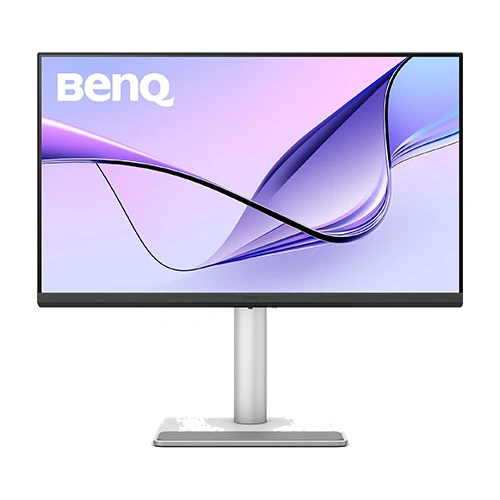
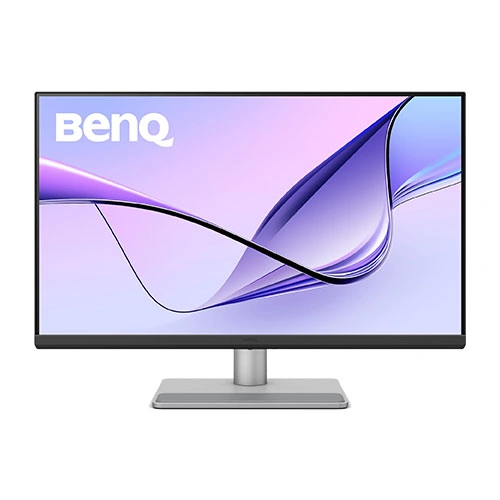
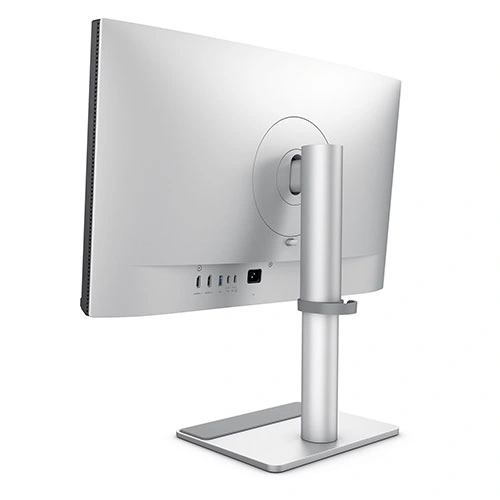
BenQ MA270UP 27-Inch 4K UHD Nano Gloss Monitor
Experience detailed 4K visuals and Mac-focused colour matching with the BenQ MA270UP. Its Nano Gloss IPS display, 95% P3 colour gamut, HDR support and versatile USB-C connectivity make it a premium choice for MacBook users, creative professionals and productivity-focused workspaces.
Key Highlights of BenQ MA270UP
4K UHD Resolution
3840 × 2160 pixels deliver sharp text, detailed images and generous workspace for demanding applications.
Nano Gloss Panel
A glossy screen finish enhances perceived clarity and contrast for vivid, engaging visuals.
Mac Colour Matching
iDevice Color Sync, M-book mode and ICCsync help create a consistent Mac-focused viewing experience.
95% P3 Colour
Wide-gamut colour reproduction supports photo editing, design work and multimedia viewing.
90W USB-C
Connect a compatible MacBook using one cable for video, data and laptop charging.
Ergonomic Stand
Height adjustment, tilt, swivel and pivot help you tailor the display to your desk and workflow.
Product Overview
The BenQ MA270UP is a 27-inch 4K monitor developed for MacBook users seeking a larger external display with Mac-focused colour tuning and convenient connectivity. Its IPS panel combines a 3840 × 2160 resolution with a 16:9 aspect ratio, providing a detailed workspace for documents, design applications, spreadsheets, web browsing and entertainment.
The Nano Gloss panel is designed to deliver rich-looking images and clear visual detail. With 99% sRGB coverage, 95% P3 coverage and support for 1.07 billion colours, the monitor is well suited to colour-conscious everyday work and compatible creative applications.
Mac-focused features such as iDevice Color Sync, M-book mode and ICCsync help coordinate colour settings between supported Apple devices and the monitor. Combined with USB-C power delivery and an adjustable stand, the MA270UP offers a streamlined desktop experience.
4K UHD Clarity with a Nano Gloss Display
The 3840 × 2160 resolution packs approximately 8.3 million pixels into a 27-inch screen, providing detailed text, defined interface elements and sharp images. Its 163 PPI pixel density makes it suitable for viewing high-resolution photographs, design layouts and detailed documents.
The IPS panel offers 178° horizontal and vertical viewing angles. A 1200:1 native contrast ratio and 450-nit typical brightness support everyday productivity and multimedia use. The glossy finish can make images appear vibrant, although reflections may be more noticeable in rooms with strong direct lighting.
The monitor supports a 60Hz refresh rate and a 5ms GtG response time. It is designed primarily for productivity, creative work and general entertainment rather than high-refresh competitive gaming.
Designed for MacBook Colour Consistency
The MA270UP is part of BenQ's MA Series for MacBook users. Its Mac-focused colour features are designed to help the external display work more naturally alongside a MacBook's built-in screen.
- iDevice Color Sync: Helps coordinate supported Apple-device colour settings with the monitor for a more consistent viewing experience.
- M-book mode: Provides a display mode designed to align the monitor's visual presentation more closely with compatible MacBook displays.
- ICCsync: Synchronizes supported ICC colour profiles and settings through BenQ's compatible software workflow.
- Display P3 mode: Provides a dedicated wide-gamut mode for compatible colour-managed content.
- Display Pilot 2: Offers supported software controls for display settings and productivity features.
Colour consistency depends on the MacBook model, display settings, application, operating system and ambient lighting. For colour-critical professional work, use an appropriate calibrated workflow and verify the display settings required for your projects.
Wide Colour Gamut and HDR Support
With 95% P3 and 99% sRGB colour gamut coverage, the MA270UP can reproduce a broad range of colours for photographs, illustrations, web content and everyday creative tasks. Its support for 1.07 billion colours helps produce smooth tonal transitions in compatible content and workflows.
The monitor supports HDR10 and VESA DisplayHDR 400. HDR-compatible content can provide a different tonal and brightness presentation from standard dynamic range content, subject to source compatibility and display configuration.
For the most accurate colour reproduction, select a suitable colour mode for your application and consider the room's lighting conditions when evaluating images or design work.
USB-C Connectivity and 90W Laptop Charging
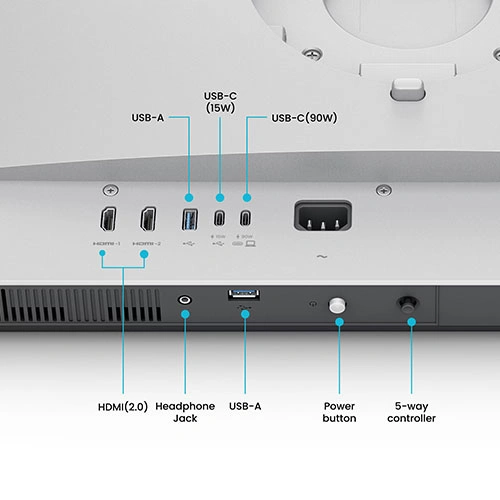
The BenQ MA270UP simplifies a modern desk with USB-C connectivity that supports DisplayPort Alt Mode, data transfer and up to 90W power delivery. With a compatible laptop, a single USB-C cable can carry the display signal and data while supplying power to the computer.
Additional ports let users connect desktop computers, consoles and peripherals. The monitor includes two HDMI 2.0 inputs, two USB-A downstream ports and one USB-C downstream port for compatible accessories.
- USB-C upstream: Video, data and up to 90W power delivery.
- HDMI 2.0: Two inputs for compatible computers and other video sources.
- USB-A downstream: Two USB 3.2 Gen 1 ports, with charging up to 7.5W per port as specified.
- USB-C downstream: One USB 3.2 Gen 1 port with charging up to 15W for compatible devices.
- Headphone jack: Connect compatible headphones or external audio equipment.
For laptop charging, connect to the monitor's 90W USB-C input rather than the downstream USB-C accessory port. Actual charging performance depends on the connected device, cable and power requirements.
Ergonomic Design for Everyday Comfort
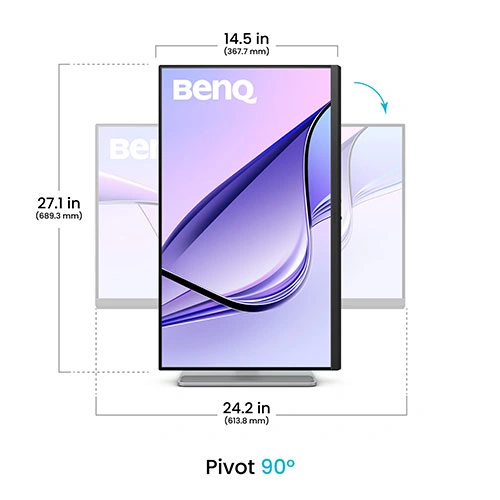
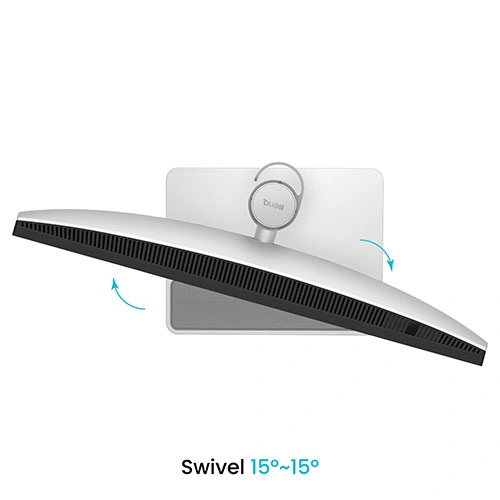
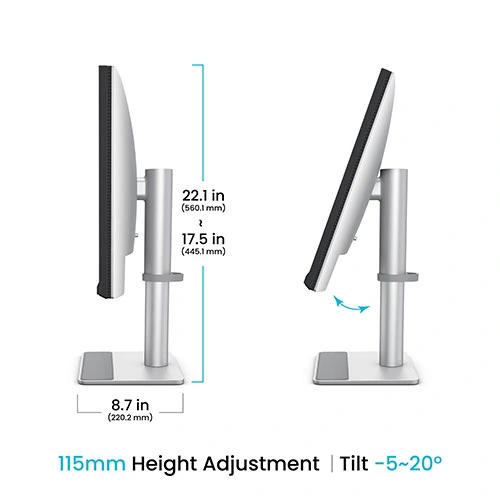
The adjustable stand allows users to set the display height and viewing angle for a more comfortable workstation. It supports tilt, swivel, pivot and up to 115mm of height adjustment, making it easier to switch between landscape and portrait orientations.
- Height adjustment: Up to 115mm.
- Tilt: -5° to +20°.
- Swivel: 15° left and right.
- Pivot: 90° rotation for portrait orientation.
- VESA mount: 100 × 100mm compatibility for supported mounting solutions.
Portrait orientation can be useful for coding, long documents and vertical content. Make sure your operating system and applications support the orientation you choose.
Eye-Care Features for Long Work Sessions
The MA270UP includes display features intended to support viewing comfort during everyday office and creative work.
- Flicker-Free technology: Designed to reduce visible or perceptible backlight flicker.
- Low Blue Light: Offers a display setting intended to reduce blue-light exposure.
- Visual Optimizer: Supports adjustments intended to help match the display to ambient lighting.
- ePaper mode: Provides an alternative presentation for reading text-heavy content.
- Colour Weakness mode: Offers colour adjustment options for users with certain colour-vision needs.
- TÜV certifications: Listed certifications include Eye Comfort 3.0, Flicker-free and Low Blue Light software solution.
Eye-care features do not eliminate eye strain for everyone. Appropriate screen positioning, comfortable room lighting, regular breaks and suitable brightness remain important.
BenQ MA270UP Technical Specifications
| Display | |
|---|---|
| Model | BenQ MA270UP |
| Screen Size | 27 inches |
| Panel Type | IPS, LED backlight |
| Maximum Resolution | 3840 × 2160 (4K UHD) |
| Aspect Ratio | 16:9 |
| Refresh Rate | 60Hz |
| Response Time | 5ms GtG |
| Typical Brightness | 450 nits |
| Peak HDR Brightness | 450 nits on the Asia-Pacific specification |
| Native Contrast Ratio | 1200:1 |
| HDR Support | HDR10, VESA DisplayHDR 400 |
| Colour Gamut | 99% sRGB, 95% P3 |
| Display Colours | 1.07 billion colours |
| Pixel Density | 163 PPI |
| Viewing Angles | 178° horizontal / 178° vertical |
| Screen Coating | Nano Gloss |
| HDCP | 2.2 |
| Mac and Colour Features | |
| Mac Colour Features | iDevice Color Sync, M-book mode, ICCsync |
| Colour Modes | Display P3, sRGB, HDR, M-book, User, Game, ePaper, Cinema |
| Display Software | Display Pilot 2 |
| Connectivity | |
| USB-C Upstream | 1 × USB-C, DisplayPort Alt Mode, data, up to 90W power delivery |
| HDMI | 2 × HDMI 2.0 |
| USB-A Downstream | 2 × USB 3.2 Gen 1, up to 5Gbps and 7.5W charging per port |
| USB-C Downstream | 1 × USB 3.2 Gen 1, up to 5Gbps and 15W charging |
| Audio | Built-in speakers, 3W × 2; headphone jack |
| Ergonomics and Dimensions | |
| Height Adjustment | 115mm |
| Tilt | -5° to +20° |
| Swivel | 15° left / 15° right |
| Pivot | 90° |
| Dimensions with Stand (H × W × D) | 560.1–445.1 × 613.8 × 220.2mm |
| Dimensions without Stand (H × W × D) | 367.7 × 613.8 × 83.5mm |
| Weight with Stand | 8.2kg |
| Weight without Stand | 5.14kg |
| VESA Mount | 100 × 100mm |
| Power and Eye Care | |
| Power Supply | Built-in, 100–240V AC |
| Typical Power Consumption | 40W |
| Sleep Power | Less than 0.5W |
| Eye-Care Features | Flicker-Free, Low Blue Light, Visual Optimizer, ePaper, Colour Weakness mode |
| Energy Standard | ENERGY STAR listed on the official specification page |
| Included Accessories | Quick Start Guide, warranty card, safety instructions; signal cables may vary by region |
Who Should Choose the BenQ MA270UP?
- MacBook Air and MacBook Pro users: Mac-focused colour modes and USB-C power delivery support a streamlined workstation.
- Graphic designers: The 4K panel and wide P3 colour gamut are useful for compatible design and illustration workflows.
- Photographers: High pixel density and wide-gamut colour support detailed photo viewing and editing.
- Video editors: The 4K resolution and HDR support provide a useful workspace for compatible editing applications.
- Office professionals: The sharp display, USB hub and ergonomic adjustments suit spreadsheets, documents and multitasking.
- Students and remote workers: A large, detailed screen can make research, online meetings and everyday productivity more convenient.
Things to Know Before Buying
- The monitor has a 60Hz refresh rate, so it is not designed for high-refresh competitive gaming.
- The Nano Gloss finish can deliver vivid visuals, but direct light sources and bright windows may create reflections.
- To use 4K at 60Hz, ensure the computer, graphics output and cable support the required display mode.
- USB-C charging up to 90W requires a compatible laptop and suitable cable. Some laptops may require more power than the monitor provides.
- Colour matching depends on device compatibility, software settings, colour profiles and ambient lighting.
- HDR capabilities depend on the content source, application and operating system. HDR support alone does not guarantee the same experience as a higher-tier HDR display.
- BenQ's regional specifications may show different HDR peak brightness or power figures. Confirm the India-market specification and included accessories before purchase.
Frequently Asked Questions
1. What is the resolution of the BenQ MA270UP?
The BenQ MA270UP features a 27-inch IPS panel with a maximum resolution of 3840 × 2160 pixels, also known as 4K UHD.
2. Is the BenQ MA270UP suitable for MacBook Pro?
Yes. It is designed for MacBook users and offers Mac-focused colour features, a 4K display and USB-C connectivity with up to 90W power delivery. Check your MacBook's supported external-display capabilities before purchase.
3. Does the MA270UP support USB-C laptop charging?
Yes. Its USB-C upstream port supports power delivery up to 90W alongside compatible video and data connections.
4. What is the refresh rate of the BenQ MA270UP?
The specified refresh rate is 60Hz, which is suitable for office productivity, creative applications, browsing and general multimedia use.
5. What does the Nano Gloss panel offer?
The Nano Gloss screen finish is designed to provide a glossy viewing experience with clear, vivid-looking visuals. Like other glossy displays, it can reflect surrounding light.
6. Is the BenQ MA270UP good for photo editing?
Its 4K resolution, 95% P3 colour gamut and Mac-focused colour tools make it suitable for many photo-editing workflows. Colour-critical projects may require calibration and application-specific colour management.
7. Does the MA270UP have built-in speakers?
Yes. The official Asia-Pacific specification lists two built-in 3W speakers and a headphone jack.
8. Can the BenQ MA270UP be mounted on a monitor arm?
Yes. It supports a 100 × 100mm VESA mount. Check that your monitor arm supports the display's weight and mounting requirements.
Build Your Next Gaming PC
Find the essential components for your next PC build with Clarion Computers. Explore quality components to create a setup that matches your performance goals and budget.