

SHOP AT CLARION COMPUTERS
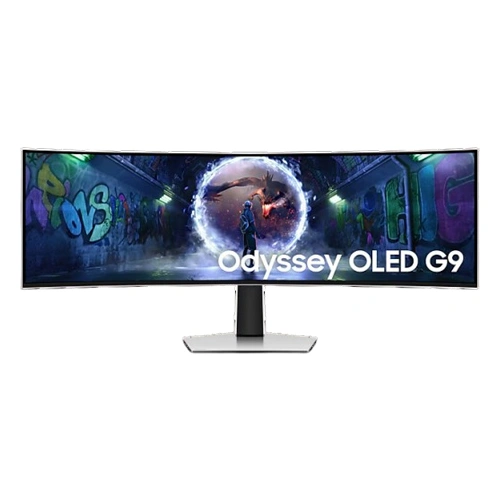
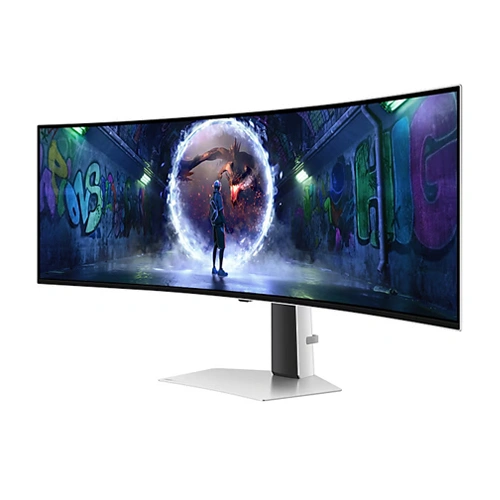
Samsung Odyssey OLED G9 49-Inch Dual QHD Gaming Monitor
Expand your view with the Samsung Odyssey OLED G9 LS49DG930SWXXL from Clarion Computers. Its 49-inch curved OLED display combines a panoramic 32:9 format, 5120 × 1440 Dual QHD resolution, a 240Hz refresh rate and a rated 0.03ms GTG response time for immersive gaming and a spacious desktop.
OLED Glare Free • 1800R Curvature • G-Sync Compatible • AMD FreeSync Premium Pro • HDR10+ Gaming
Buy from Clarion Computers49-Inch OLED
Panoramic 32:9 display
Dual QHD
5120 × 1440 resolution
240Hz
Maximum refresh rate
0.03ms GTG
Rated pixel response time
One Expansive Screen for Gaming and Multitasking
The Samsung Odyssey OLED G9 49-inch gaming monitor brings together OLED contrast and an exceptionally wide workspace. Its Dual QHD resolution provides the same pixel layout as two 2560 × 1440 displays placed side by side, with one continuous panel and no centre bezel.
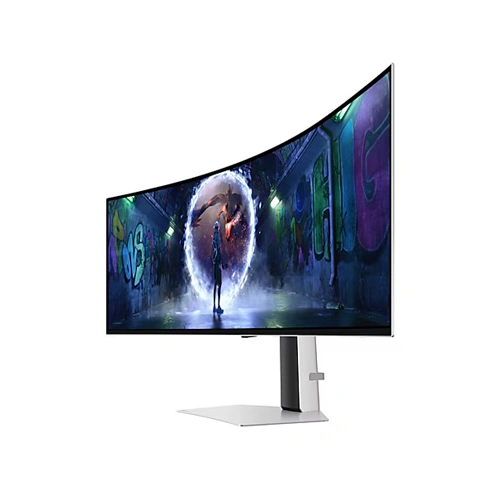
Explore wide game environments, arrange applications across your desktop or keep a long editing timeline in view. The 1800R curve wraps the display around your seating position, while OLED Glare Free helps reduce distracting reflections. Buy the LS49DG930SWXXL at Clarion Computers for an immersive PC gaming setup or a flexible workspace that also serves entertainment.
OLED Colour and Deep Blacks
The OLED panel with Quantum Dot Color technology delivers deep blacks and vibrant colour. Samsung specifies 99% DCI coverage, making the display appealing for colourful games, films and general creative work.
OLED Glare Free
Reduce reflections from surrounding light sources with Samsung's OLED Glare Free finish. It helps keep game scenes and dark areas easier to view, although room lighting and screen placement still affect the viewing experience.
240Hz with 0.03ms GTG Response
Enjoy fluid frame presentation and fast pixel transitions. The maximum 240Hz refresh rate is most useful with a PC capable of high frame rates. The rated 0.03ms GTG figure measures pixel response, rather than total input latency.
Adaptive Sync for Compatible GPUs
G-Sync Compatible and AMD FreeSync Premium Pro support help reduce tearing and improve motion consistency with compatible graphics cards. Adaptive sync performance depends on the connection, supported refresh range and settings.
Picture-by-Picture and Picture-in-Picture
Display two compatible input sources side by side with Picture-by-Picture, or show a secondary source in a smaller Picture-in-Picture window. Available resolution, refresh rate and gaming features can differ in these modes.
HDR for Supported Games and Content
HDR10 and HDR10+ Gaming support complement OLED's deep black levels. Enjoy supported HDR content with a compatible source and appropriate settings, while using the expansive format for an immersive viewing experience.
Samsung LS49DG930SWXXL Specifications
| Model | Samsung Odyssey OLED G9 G93SD — LS49DG930SWXXL |
|---|---|
| Screen Size / Panel | 49-inch OLED with Quantum Dot Color technology |
| Resolution | 5120 × 1440 Dual QHD |
| Aspect Ratio / Curvature | 32:9 / 1800R |
| Maximum Refresh Rate | 240Hz |
| Rated Response Time | 0.03ms GTG |
| Screen Finish | OLED Glare Free |
| Colour Gamut | 99% DCI coverage, CIE1976 |
| HDR Support | HDR10 and HDR10+ Gaming |
| Adaptive Sync | G-Sync Compatible and AMD FreeSync Premium Pro |
| Multi-Source Viewing | Picture-by-Picture and Picture-in-Picture |
| Burn-In Warranty Statement | Samsung lists normal-use burn-in coverage within warranty; commercial use, abuse and misuse are excluded |
Who Is the Odyssey OLED G9 Best For?
Immersive PC Gaming
Explore open worlds and cinematic games across a panoramic screen. The experience depends on each game's 32:9 support; some titles use black bars or restrict the field of view.
Sim Racing and Flight Simulation
Use the wide, curved display for cockpit views and peripheral scenery in compatible simulators. One continuous panel can simplify a setup that would otherwise use multiple monitors.
Gaming and Streaming Desks
Arrange a windowed game alongside Discord, a browser or streaming controls. Multi-source viewing offers another option, subject to the monitor's supported mode combinations.
Video Editing and Creative Work
Keep a long timeline, preview window and tool panels visible. Wide colour coverage benefits colourful content, while colour-critical projects still require appropriate calibration and colour management.
Programming and Productivity
Place your code editor, documentation, browser and terminal side by side. The Dual QHD desktop offers substantial horizontal space for development and multi-window workflows.
Charts, Dashboards and Data Analysis
View charts, watchlists, spreadsheets and dashboards together. For prolonged static layouts, follow Samsung's OLED care guidance and verify warranty eligibility for your intended use.
Buy Samsung Odyssey OLED G9 from Clarion Computers
Upgrade to a panoramic OLED display built for immersive gaming and flexible multitasking. Visit Clarion Computers to check the Samsung LS49DG930SWXXL price, current availability and applicable warranty terms. Match the monitor with a suitable graphics card and a desk that accommodates its 49-inch format.
Check Price at Clarion ComputersFrequently Asked Questions
Is the Samsung LS49DG930SWXXL a 4K monitor?
No. Its native resolution is 5120 × 1440 Dual QHD with a 32:9 aspect ratio. Conventional 4K UHD is 3840 × 2160, which has a different shape and greater vertical resolution.
Can this monitor replace two QHD monitors?
Its pixel layout matches two 2560 × 1440 screens side by side. It can replace that desktop arrangement for many users, although window management and application behaviour differ from using two independent monitors.
Will every game fill the 32:9 screen?
No. Ultrawide support varies by game. Some titles support 32:9 gameplay, while others limit the aspect ratio or show black bars, particularly in cutscenes or competitive modes.
What graphics card do I need for Dual QHD at 240Hz?
Choose a GPU based on your games, settings and desired frame rates. The 5120 × 1440 resolution contains approximately 7.37 million pixels, twice as many as standard QHD. Demanding games may require reduced settings or supported upscaling to reach higher frame rates.
Does 0.03ms GTG mean 0.03ms input lag?
No. GTG measures how quickly a pixel changes between grey values. It does not measure the full delay between a mouse or controller input and the visible result.
Does it support NVIDIA G-Sync and AMD FreeSync?
Yes. Samsung lists G-Sync Compatible and AMD FreeSync Premium Pro support. Use compatible hardware, a supported connection and the appropriate settings to enable adaptive sync.
Does the Odyssey OLED G9 support HDR?
Yes. The model supports HDR10 and HDR10+ Gaming. HDR operation depends on compatible content, source hardware and enabled settings.
Can I display two computers at the same time?
Yes, supported input combinations can be displayed through Picture-by-Picture or Picture-in-Picture. Check the manual for mode-specific resolution, refresh-rate and feature restrictions.
Is OLED Glare Free completely reflection-free?
It reduces glare from external light sources, but does not eliminate the effects of all room lighting. Avoid placing strong lights directly in front of the screen.
Is it suitable for programming and office work?
The wide workspace is useful for multiple applications, spreadsheets and coding tools. When displaying static interfaces for extended periods, follow Samsung's OLED care instructions and use the recommended screen-protection settings.
Is it suitable for professional colour-critical editing?
The OLED panel and wide colour gamut are useful for creative content. Professional colour-critical workflows also require suitable calibration, colour management and validation of accuracy for the intended output.
Does Samsung cover OLED burn-in under warranty?
Samsung's product specification lists burn-in under normal usage as covered within warranty, excluding commercial use, abuse and misuse. Confirm the current regional terms and coverage for the specific unit with Clarion Computers before purchasing.
Where can I buy Samsung Odyssey OLED G9 LS49DG930SWXXL?
Visit Clarion Computers to check the current price, stock status, purchase options and applicable warranty details for this model.