

Welcome to Clarion Computers Pvt. Ltd
Product Suggestions

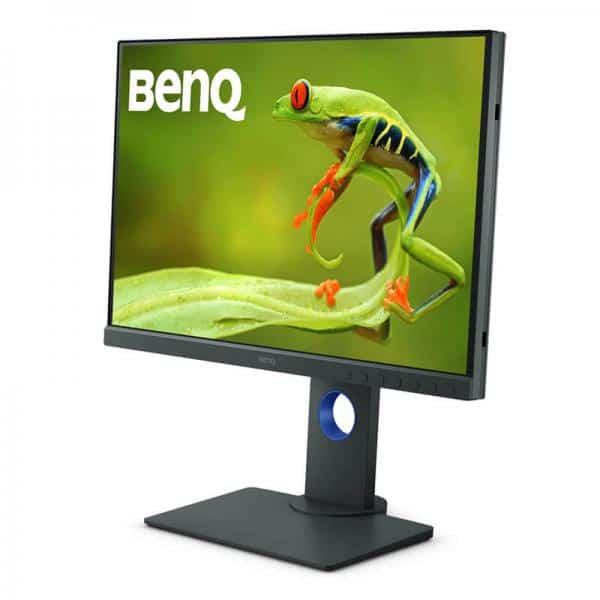
BenQ SW240 24 Inch 60Hz 5ms WUXGA IPS Panel Monitor

BenQ SW240 24.1-inch WUXGA IPS monitor with 60Hz refresh rate, 100% sRGB, 99% Adobe RGB, hardware calibration support and an ergonomic adjustable stand. Designed for photographers and creative professionals who need accurate colour reproduction.

₹25,200.00
Name

FAQs

Yes, we provide GST billing for all eligible purchases. You will receive a GST invoice with your order.
Yes, this product includes official brand warranty as per the manufacturer’s terms.
Yes, EMI options (including No-cost EMI on select cards) may be available at checkout depending on your bank and order value.
Orders placed before the daily cut-off time are dispatched the same day (working days). Actual delivery time depends on your pincode.

BenQ PhotoVue Series

BenQ SW240 24.1-Inch WUXGA IPS Monitor

Experience detailed images and dependable colour reproduction with a professional monitor designed for photography, image editing and other colour-critical creative workflows. The SW240 combines WUXGA resolution with broad colour gamut coverage and hardware calibration support.

24.1"

IPS Display

1920 × 1200

WUXGA Resolution

60Hz

Refresh Rate

100% sRGB

Colour Coverage

Product Overview

The BenQ SW240 is a 24.1-inch professional monitor built for creators who need consistent and accurate colour representation. Its 1920 × 1200 WUXGA resolution and 16:10 aspect ratio provide additional vertical workspace compared with a standard 16:9 Full HD screen. The IPS panel offers wide viewing angles, while its extensive colour gamut supports photo editing, design and colour-managed workflows.

Key Features of the BenQ SW240

WUXGA Resolution and 16:10 Workspace

The 1920 × 1200 resolution delivers clear detail for editing photographs, working with documents and managing creative applications. Its 16:10 aspect ratio provides extra vertical screen space for timelines, tool panels and long documents.

IPS Panel with Wide Viewing Angles

The IPS panel supports 178° horizontal and vertical viewing angles, helping maintain a consistent viewing experience from different positions. The matte screen coating helps reduce reflections from surrounding light.

Wide Colour Gamut for Creative Work

The SW240 covers 100% sRGB, 99% Adobe RGB and 95% P3 according to BenQ's published specifications. These colour spaces support a range of photography, design and digital content workflows where colour reproduction matters.

Hardware Calibration and Colour Accuracy

Hardware calibration support and a factory calibration report help users manage colour accuracy for supported workflows. The monitor features a 14-bit 3D-LUT and an average Delta E specification of ≤2. Compatible calibration software is available from BenQ.

Dedicated Colour Modes

Choose from modes including Adobe RGB, sRGB, Rec.709, DCI-P3, Black & White and Darkroom, alongside calibration and custom modes. These options help tailor the display to different creative tasks.

Ergonomic Stand and Shading Hood Support

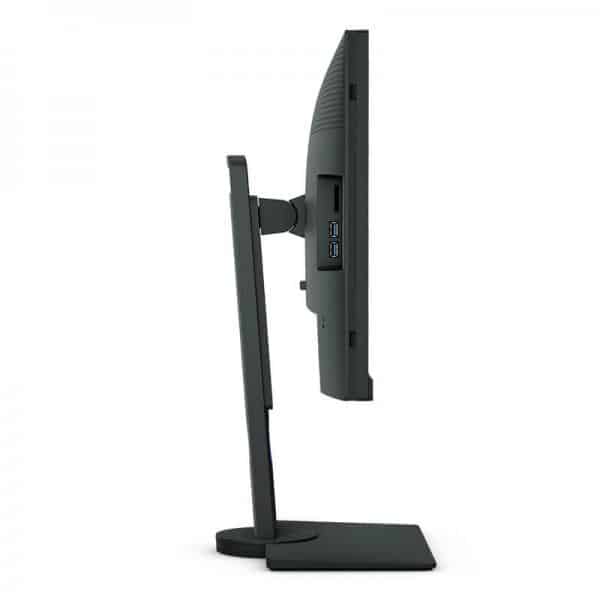
The supplied stand supports height adjustment up to 140 mm, tilt, swivel and pivot positioning. The monitor is also compatible with the BenQ SH240 shading hood, designed to help reduce unwanted glare and reflections in suitable working environments.

Display Performance

The BenQ SW240 features a 60Hz refresh rate and 5ms GtG response time. Its typical brightness is 250 nits, with a native contrast ratio of 1000:1. These specifications suit professional image work and everyday productivity rather than high-refresh-rate gaming.

Connectivity and Expansion

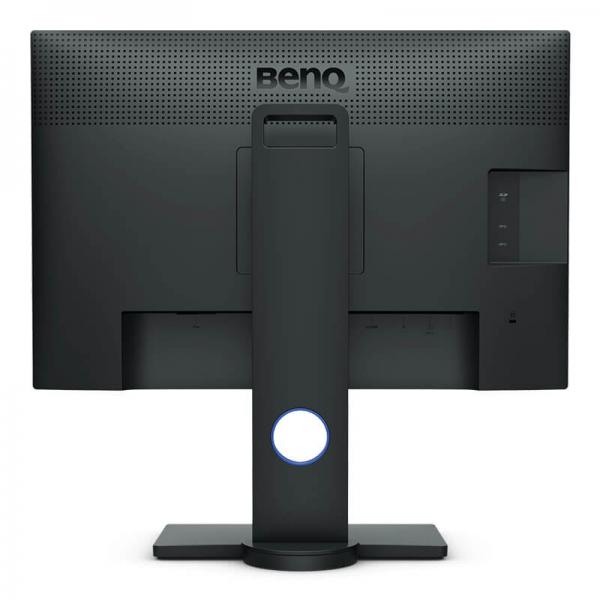
Connect compatible computers and devices through HDMI 1.4, DisplayPort 1.2 and dual-link DVI-D. The monitor also includes a USB upstream connection, two USB 3.0 downstream ports, a multi-format card reader and a headphone jack.

Technical Specifications

Brand BenQ
Model SW240
Series PhotoVue
Screen Size 24.1 inches
Panel Type IPS, LED backlight
Resolution 1920 × 1200 WUXGA
Aspect Ratio 16:10
Refresh Rate 60Hz
Response Time 5ms GtG
Brightness 250 nits (typical)
Native Contrast Ratio 1000:1
Viewing Angles 178° horizontal / 178° vertical
Colour Gamut 100% sRGB, 99% Adobe RGB, 95% P3
Display Colours 1.07 billion
Screen Coating Matte
Colour Calibration Hardware calibration support; factory calibration report
3D-LUT 14-bit
Delta E Average ≤2
Video Inputs HDMI 1.4 × 1, DisplayPort 1.2 × 1, DVI-DL × 1
USB USB Type-B upstream × 1, USB 3.0 downstream × 2
Card Reader SD / SDHC / SDXC / MMC
Audio Headphone jack
Ergonomics 140mm height adjustment, tilt, swivel and pivot
VESA Mount 100 × 100mm
Power Consumption 19W typical, 55W maximum, 0.5W sleep mode
Power Supply Built-in, 100–240V
Dimensions with Stand 533.2 × 230.7 × 403.9–543.5mm (W × D × H)
Dimensions without Base 533.2 × 56.4 × 356.2mm (W × D × H)
Weight with Stand 6.7kg
Weight without Base 4.9kg

Ideal Uses

  • Photography and photo retouching
  • Graphic design and digital content creation
  • Colour-managed creative workflows
  • Office productivity and document work
  • Video and media work requiring supported colour modes

Things to Know Before Buying

  • The native resolution is 1920 × 1200 WUXGA, not 2560 × 1440 or 4K.
  • The refresh rate is 60Hz, making it more suited to creative and productivity work than high-refresh-rate gaming.
  • Hardware calibration requires a compatible calibration device and software.
  • The SH240 shading hood is an optional accessory; confirm package contents with the seller.
  • Included cables may vary by region or package.

Frequently Asked Questions

What is the resolution of the BenQ SW240?

The BenQ SW240 has a WUXGA resolution of 1920 × 1200 pixels and a 16:10 aspect ratio.

Is the BenQ SW240 suitable for photo editing?

Yes. Its broad colour gamut, dedicated colour modes, factory calibration report and hardware calibration support make it suitable for photography and other colour-critical creative tasks.

What colour gamut does the SW240 support?

BenQ lists 100% sRGB, 99% Adobe RGB and 95% P3 colour gamut coverage.

Does the BenQ SW240 support height adjustment?

Yes. Its stand supports up to 140mm of height adjustment, along with tilt, swivel and pivot adjustments.

What connectivity options are available?

The monitor provides HDMI 1.4, DisplayPort 1.2, dual-link DVI-D, USB upstream and downstream ports, a card reader and a headphone jack.

Does it support wall mounting?

Yes. The BenQ SW240 supports VESA 100 × 100mm mounting.

Build Your Next Gaming PC

Find the essential components for your next PC build with Clarion Computers. Explore quality components to create a setup that matches your performance goals and budget.

BenQ SW240 24.1-Inch WUXGA Professional Monitor

Model: SW240 | IPS Panel | 100% sRGB | 99% Adobe RGB | 60Hz

Technical Specifications

Brand BenQ
Product Series PhotoVue SW Series
Model Number SW240
Screen Size 24.1 inches (61.214 cm)
Panel Type IPS
Backlight Technology LED backlight
Resolution WUXGA (1920 × 1200)
Aspect Ratio 16:10
Refresh Rate 60 Hz
Response Time 5 ms (GtG)
Brightness 250 nits (typical)
Native Contrast Ratio 1000:1
Dynamic Contrast Ratio 20,000,000:1 (typical)
Viewing Angles 178° horizontal / 178° vertical
Display Colours 1.07 billion colours
Colour Gamut 100% sRGB, 99% Adobe RGB, 95% DCI-P3
Pixel Density 94 PPI
Screen Surface Matte, anti-glare
Colour Depth 10-bit colour support; up to 1.07 billion colours
HDCP HDCP 1.4
HDR Support Not specified as an HDR monitor
Product Colour Grey

Features & Technology

AQCOLOR Technology Designed to provide accurate and consistent colour reproduction for creative professionals.
100% sRGB Coverage Suitable for sRGB-focused design, web graphics and digital content workflows.
99% Adobe RGB Provides a wide colour gamut for photography and print-oriented editing.
95% DCI-P3 Supports a broad colour range for compatible creative and video workflows.
Factory Calibration Includes an individual factory calibration report for colour performance reference.
Hardware Calibration Supports hardware calibration with compatible calibration equipment and software.
14-bit 3D LUT Helps manage colour transitions and colour accuracy in supported calibration workflows.
Delta E Factory calibration target of average Delta E ≤ 2.
Uniformity Technology Helps maintain consistent brightness and colour across the screen.
Colour Modes Adobe RGB, sRGB, Rec.709, DCI-P3, Black & White, Darkroom and calibration presets.
Black & White Mode Provides a monochrome viewing mode for photography workflows.
Darkroom Mode Offers a picture mode designed for darkroom-style editing environments.
Colour Mode HotKey Allows quick switching between selected colour modes.
Palette Master Software Supports BenQ colour calibration software with compatible calibrators.
Shading Hood Compatibility Compatible with the optional BenQ SH240 shading hood to reduce ambient-light glare.

Connectivity

HDMI 1 × HDMI 1.4
DisplayPort 1 × DisplayPort 1.2
DVI 1 × DVI-D Dual Link
USB Upstream 1 × USB Type-B upstream port
USB Downstream 2 × USB 3.0 ports
Card Reader Built-in multi-format SD card reader supporting SD/SDHC/SDXC/MMC
Headphone Jack Yes
USB-C Not available
Built-in Speakers No built-in speakers listed
Wireless Connectivity Not supported

Design, Dimensions & Power

Stand Design Ergonomic adjustable stand
Height Adjustment 140 mm
Tilt Adjustment -5° to +20°
Swivel Adjustment -45° to +45°
Pivot 90° rotation
VESA Wall Mount 100 × 100 mm
Dimensions with Stand (H × W × D) 403.9–543.5 × 533.2 × 230.7 mm
Dimensions without Stand (H × W × D) 356.2 × 533.2 × 56.4 mm
Dimensions with Shading Hood (H × W × D) 415.3–554.9 × 545.4 × 230.7 mm
Weight with Stand 6.7 kg
Weight without Stand 4.9 kg
Weight with Shading Hood 7.6 kg
Power Supply Built-in power supply
Input Voltage AC 100–240 V
Typical Power Consumption 19 W
Maximum Power Consumption 55 W
Sleep Mode Power Consumption 0.5 W
Included Accessories Power cable, signal cables, USB cable, quick-start guide, warranty card and factory calibration report; contents may vary by region.
Shading Hood Optional accessory; verify whether included with the specific retail package.
Country of Origin China, according to BenQ India specifications

Recommended Use Cases

  • Professional photography: Use the wide Adobe RGB gamut for photo editing and print-oriented workflows.
  • Graphic design: Work with sRGB and other supported colour modes for digital design projects.
  • Photo retouching: Take advantage of factory calibration and hardware calibration support.
  • Video editing: Use the Rec.709 and DCI-P3 colour modes for compatible editing workflows.
  • Print production: Benefit from Adobe RGB coverage when working with colour-managed applications and suitable output devices.
  • Office productivity: The 16:10 WUXGA resolution provides additional vertical workspace compared with a standard 16:9 Full HD monitor.
  • Document comparison: Use the extra vertical resolution to review documents, reference material and timelines.

Frequently Asked Questions

1. Is the BenQ SW240 a Full HD monitor?

It has a WUXGA resolution of 1920 × 1200 pixels, which provides more vertical workspace than standard 1920 × 1080 Full HD.

2. Does it support 100% sRGB?

Yes. BenQ specifies 100% sRGB coverage, along with 99% Adobe RGB and 95% DCI-P3 coverage.

3. Is this monitor suitable for photo editing?

Yes. Its wide colour gamut, factory calibration report and hardware calibration support make it suitable for photography and colour-focused workflows.

4. Does the BenQ SW240 support hardware calibration?

Yes. Hardware calibration is supported using compatible calibration equipment and BenQ software.

5. Does it have USB-C connectivity?

No. The SW240 uses HDMI, DisplayPort and DVI-D Dual Link inputs. A compatible USB-C-to-display adapter may be needed for some laptops.

6. What is the maximum refresh rate?

The monitor supports a refresh rate of up to 60 Hz, making it primarily a professional and productivity display rather than a high-refresh gaming monitor.

7. Is the shading hood included?

The SH240 shading hood is a compatible accessory, but inclusion depends on the specific package or seller. Confirm before purchasing.

8. What is the warranty period?

Warranty coverage depends on the country, seller and purchase terms. Confirm the applicable BenQ India warranty for the exact unit before buying.

Before You Buy

  • Confirm the exact model: BenQ SW240.
  • Check that your computer supports 1920 × 1200 output at 60 Hz.
  • For accurate colour work, use a colour-managed workflow and recalibrate periodically with a compatible calibrator.
  • Remember that colour coverage figures alone do not guarantee colour accuracy in every environment.
  • The monitor does not provide USB-C video or laptop charging, and built-in speakers are not listed.
  • Confirm the included cables, shading hood, warranty, current price and stock with the authorised seller.

Explore BenQ PhotoVue SW240

Check official BenQ India specifications, features, accessories and support information.

View Official Product Page

Specifications and included accessories may vary by region or retail package. Verify final details with BenQ India before purchase.

Hardware
  • QHD (2560*1440)
  • IPS Panel
  • 60 Hz
  • Benq
  • 24 Inch
  • 5 ms
Add a review