
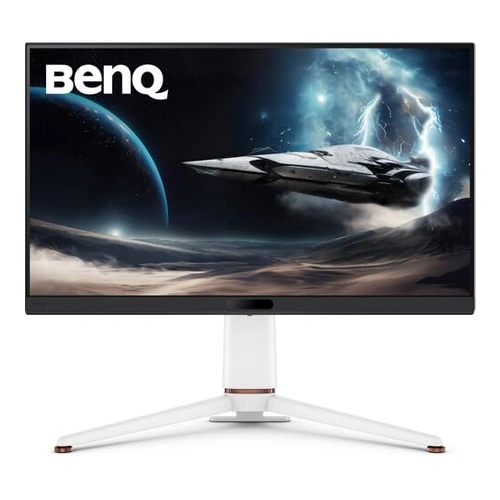
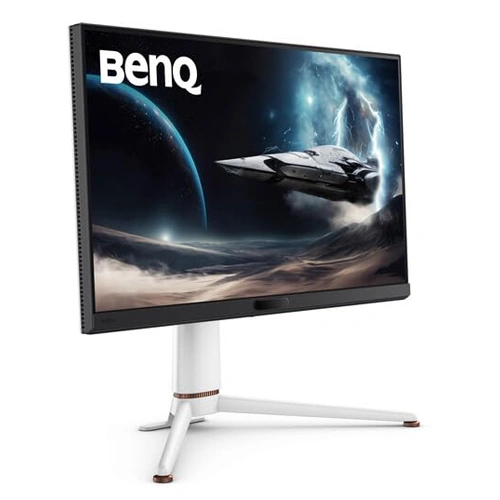
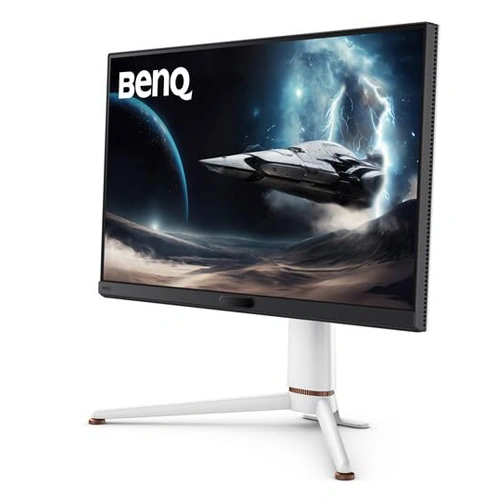

BenQ MOBIUZ Gaming Series
BenQ MOBIUZ EX271Q 27-inch QHD 180Hz Gaming Monitor
Step into immersive gaming with the BenQ MOBIUZ EX271Q. Featuring a 27-inch QHD IPS display, up to 180Hz refresh rate, 1ms GtG response time, AMD FreeSync Premium, and HDR support, this monitor combines detailed visuals with responsive gameplay. AI-powered contrast enhancement, Game Optimized Color, USB-C connectivity with 65W Power Delivery, and KVM functionality make it a versatile addition to a modern gaming and productivity setup.
BenQ MOBIUZ EX271Q Key Highlights
2560 × 1440
QHD resolution for sharper gaming and desktop visuals.
180Hz
High refresh rate via DisplayPort for fluid gameplay.
95% P3
Wide colour gamut for rich, vibrant imagery.
65W USB-C
Video, data, and compatible laptop power delivery through one connection.
Product Overview
The BenQ MOBIUZ EX271Q is a 27-inch QHD gaming monitor built for players who want detailed graphics, smooth motion, and flexible connectivity. Its 2560 × 1440 IPS panel offers more screen detail than a Full HD monitor of the same size, while the 95% P3 colour gamut supports vivid and immersive visuals.
With up to 180Hz refresh rate through DisplayPort and a 1ms GtG response time, the EX271Q is designed for responsive gameplay. AMD FreeSync Premium helps synchronise the display with compatible graphics hardware, while HDR10 and VESA DisplayHDR 400 support enhance compatible content.
BenQ's MOBIUZ PixSoul Engine, AI Contrast, Game Optimized Color, Color Vibrance, and Light Tuner provide additional tools to refine the visual experience. USB-C connectivity with 65W Power Delivery, an integrated KVM switch, and an ergonomic stand make this monitor useful for both gaming and multi-device desktop workflows.
Features and Benefits
27-inch QHD IPS Display
The 2560 × 1440 Quad HD resolution delivers detailed images, crisp text, and additional desktop workspace compared with Full HD. IPS panel technology provides wide 178° horizontal and vertical viewing angles, helping maintain consistent visuals when viewed from different positions.
180Hz Refresh Rate and 1ms GtG Response Time
A refresh rate of up to 180Hz via DisplayPort enables fluid motion in fast-paced games. The 1ms Grey-to-Grey response time supports quick pixel transitions, helping improve responsiveness during competitive shooters, racing games, and action titles. HDMI supports up to 144Hz according to BenQ's specifications.
AMD FreeSync Premium
AMD FreeSync Premium helps synchronise the monitor's refresh rate with compatible graphics hardware, reducing screen tearing and stuttering for a smoother gaming experience. Actual performance depends on the connected device, game, and settings.
HDR10 and VESA DisplayHDR 400
HDR10 and DisplayHDR 400 support allow compatible content to deliver enhanced brightness range and visual detail. BenQ HDRi modes offer additional image processing options for different types of entertainment. The visible HDR effect depends on the content and display settings.
95% P3 Colour Gamut and Game Optimized Color
The wide 95% P3 colour gamut supports vivid, expressive visuals for gaming and multimedia. BenQ's Game Optimized Color technology is designed to provide game-focused colour presentation, while Color Vibrance and Light Tuner let users adjust colour intensity and shadow detail to their preferences.
MOBIUZ PixSoul Engine and AI Contrast
BenQ's PixSoul Engine combines panel standardisation, adaptive contrast adjustment, game colour alignment, and AI-enhanced auto adjustment. AI Contrast analyses image content and adjusts contrast by zones to help reveal detail in darker scenes, giving gamers more control over their visual experience.
USB-C Connectivity with 65W Power Delivery
The USB-C connection supports DisplayPort Alt Mode, USB data, and up to 65W Power Delivery. Compatible laptops can transmit video, exchange data, and receive power through a single cable, helping reduce desktop cable clutter. Confirm that the laptop supports USB-C DisplayPort Alt Mode and charging before relying on this connection.
Built-in KVM Switch
The integrated KVM switch allows compatible connected computers to share a keyboard and mouse through the monitor's USB connections. This is useful for users who switch between a gaming desktop and a work laptop without needing separate input devices for each system.
Flexible Ergonomic Stand
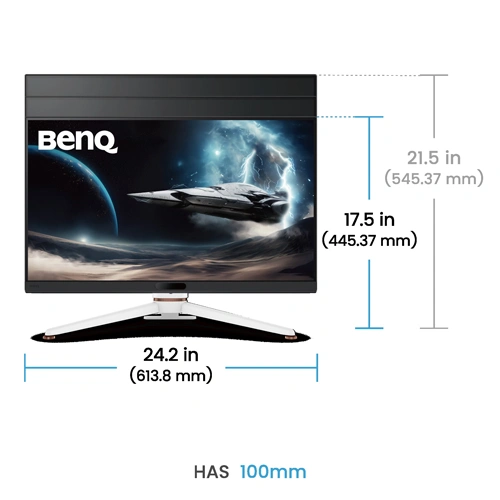
The supplied stand supports 100mm height adjustment, tilt, swivel, and pivot rotation. These adjustments help users position the display for a more comfortable setup, whether gaming, working, or viewing content in portrait orientation.
Eye-Care Technologies
Flicker-Free technology, Low Blue Light, and Brightness Intelligence Plus Gen2 are designed to support viewing comfort during extended sessions. Color Weakness settings provide additional display adjustments for different colour-perception needs.
BenQ MOBIUZ EX271Q Specifications
| General Information | |
|---|---|
| Brand | BenQ |
| Series | MOBIUZ |
| Model | EX271Q |
| Product Type | Gaming Monitor |
| Product Colour | White (manufacturer datasheet) |
| Display | |
| Screen Size | 27 inches / 68.58cm |
| Panel Type | IPS |
| Backlight Technology | LED backlight |
| Resolution | 2560 × 1440 (QHD / 2K) |
| Aspect Ratio | 16:9 |
| Refresh Rate | DisplayPort: up to 180Hz; HDMI: up to 144Hz |
| Response Time | 1ms GtG |
| Typical Brightness | 350 nits |
| Peak HDR Brightness | 400 nits |
| Native Contrast Ratio | 1000:1 |
| Viewing Angles | 178° horizontal / 178° vertical |
| Colour Gamut | 95% P3 |
| Display Colours | 1.07 billion colours |
| Pixel Density | 108 PPI |
| Screen Coating | Matte |
| HDR Support | HDR10, VESA DisplayHDR 400, HDRi |
| HDCP | 2.2 |
| Gamma Range | 1.8–2.6 |
| Gaming and Image Features | |
| Adaptive Sync | AMD FreeSync Premium |
| Motion Blur Reduction | Yes |
| AI Image Technology | MOBIUZ PixSoul Engine and AI Contrast |
| Colour Controls | Game Optimized Color, Color Vibrance, Light Tuner |
| HDR Modes | Cinema HDRi, Sci-fi HDRi, Realistic HDRi, Fantasy HDRi, DisplayHDR and additional presets |
| Colour Profiles | Color Shuttle, Display P3, sRGB, Custom, Gamer 1, Gamer 2, Gamer 3 and other presets |
| Connectivity and Audio | |
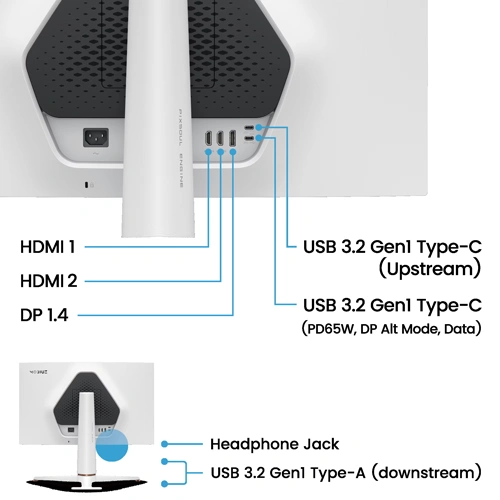
| HDMI | 2 × HDMI 2.0 |
| DisplayPort | 1 × DisplayPort 1.4 |
| USB-C Video/Data/Power | 1 × USB-C with DisplayPort Alt Mode, data and 65W Power Delivery |
| USB-C Upstream | 1 × USB 3.2 Gen 1, 5Gbps, data only |
| USB-A Downstream | 2 × USB 3.2 Gen 1, 5Gbps, up to 4.5W charging |
| KVM Switch | Yes |
| Audio Output | 2.0-channel audio output |
| Headphone Jack | Yes |
| Eye Care and Ergonomics | |
| Eye-Care Features | Flicker-Free, Low Blue Light, B.I.+ Gen2, Color Weakness |
| Tilt Adjustment | -5° to +15° (specification listing) |
| Swivel | ±15° |
| Pivot | 90° |
| Height Adjustment | 100mm |
| VESA Mount | 100 × 100mm |
| Dimensions, Weight and Power | |
| Dimensions with Stand, Landscape (H × W × D) | 545.4 × 613.8 × 276.8mm |
| Dimensions with Stand, Portrait (H × W × D) | 664.8 × 511.4 × 276.8mm |
| Dimensions without Base (H × W × D) | 374.9 × 613.8 × 92mm |
| Weight with Stand | 7.2kg |
| Weight without Base | 5.3kg |
| Voltage Rating | 100–240V |
| Power Consumption (Typical) | 23.5W |
| Power Consumption (Maximum) | 170W |
| Power Consumption (Sleep) | Less than 0.5W |
| Environmental Standards and Accessories | |
| Environmental Standard | EPEAT |
| Eye-Care Certification | TÜV Low Blue Light hardware solution |
| Included Accessories | Power cord, HDMI cable, USB-C cable, USB-C-to-A cable, remote control, quick start guide and documentation; package contents may vary by region. |
Who Should Choose the BenQ MOBIUZ EX271Q?
Competitive PC Gaming
The 180Hz DisplayPort refresh rate, 1ms GtG response time, and FreeSync Premium support suit fast-paced shooters, action games, and racing titles.
Immersive AAA Gaming
QHD resolution, wide colour coverage, HDR support, and AI Contrast help deliver detailed and engaging visuals in compatible games.
Laptop and Desktop Setups
USB-C video, data and 65W Power Delivery, together with KVM functionality, help simplify workflows across compatible computers.
Work and Entertainment
The QHD panel, ergonomic stand, colour presets, and eye-care features make it useful for everyday productivity and multimedia.
Things to Know Before Buying
- The maximum refresh rate is connection-dependent: up to 180Hz via DisplayPort and up to 144Hz via HDMI, according to BenQ's specifications.
- For QHD gaming at high refresh rates, use a compatible graphics card, supported output, and suitable cable.
- USB-C Power Delivery supports up to 65W. Laptop charging depends on the laptop's requirements and compatibility.
- The monitor has two different USB-C-related connections: one supports video, data, and 65W Power Delivery; the separate USB-C upstream port is for USB data only.
- KVM functionality requires compatible computer connections and suitable USB peripheral connections.
- DisplayHDR 400 is an entry-level HDR certification. HDR appearance varies with content, brightness, and display settings.
- The included stand provides height, tilt, swivel, and pivot adjustment. A compatible 100 × 100mm VESA mount is also supported.
Frequently Asked Questions
1. What is the resolution of the BenQ MOBIUZ EX271Q?
The EX271Q features a 27-inch IPS panel with a QHD resolution of 2560 × 1440 pixels, providing more detail and workspace than Full HD at the same screen size.
2. What is the maximum refresh rate of the EX271Q?
The monitor supports up to 180Hz through DisplayPort and up to 144Hz through HDMI, subject to the connected device and supported settings.
3. Does the BenQ MOBIUZ EX271Q support AMD FreeSync Premium?
Yes. AMD FreeSync Premium helps synchronise the display refresh rate with compatible graphics hardware to reduce tearing and stuttering.
4. Does the EX271Q support HDR?
Yes. It supports HDR10, VESA DisplayHDR 400, and BenQ HDRi modes for compatible content.
5. Can I connect and charge my laptop through USB-C?
Yes, through the dedicated USB-C connection that supports DisplayPort Alt Mode, data, and up to 65W Power Delivery. Your laptop must support compatible USB-C video and charging features.
6. What does the KVM switch do?
The integrated KVM switch lets compatible connected computers share a keyboard and mouse through the monitor's USB connections, making it easier to switch between a work computer and a gaming PC.
7. Is the BenQ MOBIUZ EX271Q height-adjustable?
Yes. Its stand supports 100mm height adjustment, tilt, swivel, and pivot rotation. The monitor also supports 100 × 100mm VESA mounting.
8. Is the EX271Q suitable for both gaming and work?
Yes. Its QHD resolution, high refresh rate, ergonomic stand, USB-C connectivity, 65W Power Delivery, and KVM functionality make it suitable for gaming and compatible multi-computer productivity setups.
9. What is the difference between the BenQ EX271 and EX271Q?
The EX271 is a Full HD 1920 × 1080 monitor, while the EX271Q offers QHD 2560 × 1440 resolution. The EX271Q also includes a height-adjustable stand, KVM functionality, and USB-C video connectivity with 65W Power Delivery.
Build Your Next Gaming PC
Find the essential components for your next PC build with Clarion Computers. Explore quality components to create a setup that matches your performance goals and budget.