


BenQ Eye-Care Monitor
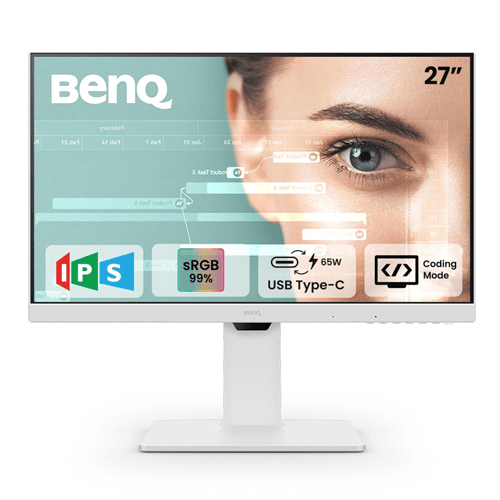
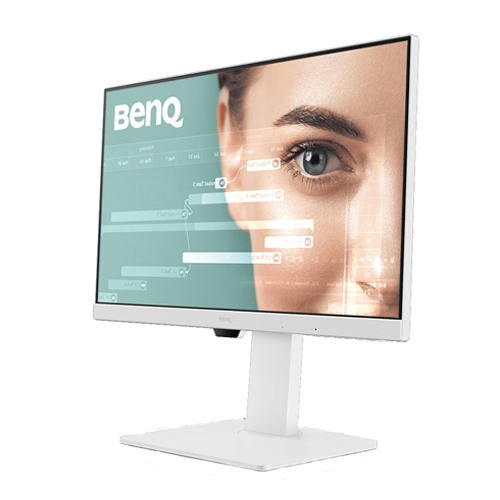
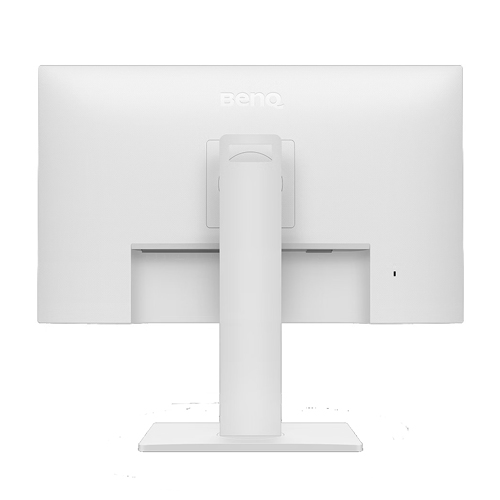
BenQ GW2786TC 27-Inch Full HD IPS Monitor
Upgrade your workspace with smooth 100Hz visuals, single-cable USB-C connectivity, ergonomic adjustment and integrated communication features designed for modern productivity.
BenQ GW2786TC: Key Highlights
27-Inch Full HD IPS Display
A spacious 1920 × 1080 workspace with wide viewing angles for office tasks, coding, browsing and multimedia.
Smooth 100Hz Performance
Enjoy smoother scrolling, window movement and everyday desktop interactions compared with conventional 60Hz displays.
USB-C with 65W Power Delivery
Connect a compatible laptop for video, data and charging through a single USB-C cable.
99% sRGB Colour Coverage
Broad sRGB coverage supports natural-looking colours for web content, presentations and everyday creative work.
DisplayPort Daisy Chaining
Use the DisplayPort output with MST-compatible equipment to extend your workspace across supported monitors.
Built-In Audio and Microphone
Integrated stereo speakers and a noise-cancellation microphone help simplify online meetings and everyday communication.
Overview of BenQ GW2786TC
The BenQ GW2786TC is a 27-inch Full HD IPS monitor designed for professionals, programmers, students and home-office users. Its 1920 × 1080 resolution provides a practical workspace for documents, spreadsheets, browser windows, presentations and everyday multimedia.
The 100Hz refresh rate provides smoother motion during scrolling and navigation, while 99% sRGB colour coverage supports vibrant, consistent-looking colours for general productivity and online content. The IPS panel offers 178° horizontal and vertical viewing angles.
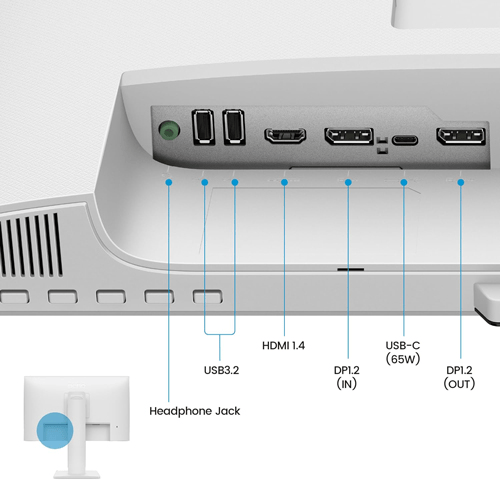
USB-C connectivity with up to 65W Power Delivery helps reduce cable clutter by combining supported video, data and charging functions. DisplayPort daisy chaining, two USB-A downstream ports, built-in speakers and a noise-cancellation microphone add flexibility for modern workstations.
Its adjustable stand and BenQ Eye-Care features make it a versatile option for users who spend extended periods working at a desk.
Full HD IPS Display with Smooth 100Hz Performance
The GW2786TC combines a 27-inch IPS panel with Full HD resolution for everyday computing. The wide viewing angles help maintain consistent-looking visuals when the screen is viewed from different positions, making it practical for individual work and shared-screen tasks.
Its 100Hz refresh rate improves the smoothness of scrolling, moving windows and browsing supported content. With a typical brightness of 250 nits and a native contrast ratio of 1300:1, the display is designed for ordinary indoor working environments.
The 99% sRGB colour gamut supports attractive colours for websites, presentations, online learning and general content creation. A matte screen coating helps minimise distracting reflections in typical office settings.
USB-C Connectivity with 65W Power Delivery
The USB-C connection supports DisplayPort Alt Mode, data transfer and up to 65W Power Delivery. With a compatible laptop and cable, one connection can carry the display signal and data while supplying power to the laptop.
This single-cable approach can help reduce desk clutter and simplify connecting or disconnecting a laptop from a home-office workstation. The monitor also includes two USB-A downstream ports for compatible peripherals such as a keyboard, mouse or other USB accessories.
Compatibility note: The connected computer's USB-C port must support DisplayPort Alt Mode for video output. Charging performance depends on the laptop's power requirements and the capabilities of the USB-C connection.
Expand Your Workspace with DisplayPort Daisy Chaining
The GW2786TC supports DisplayPort Multi-Stream Transport (MST) through its DisplayPort output. With compatible source hardware and monitor connections, this allows supported multi-monitor daisy-chain configurations.
A multi-display workspace can be useful for programming, spreadsheets, research, document comparison and multitasking across several applications.
Apple Mac computers generally require a compatible Thunderbolt-based solution or docking station for multi-display daisy chaining. Actual display support depends on the computer, operating system, ports, cables and display configuration.
Built-In Speakers and Noise-Cancellation Microphone
The integrated 2W × 2 stereo speakers provide convenient sound for video calls, online lessons, system notifications and everyday entertainment. A headphone jack is also available for compatible headphones or external audio equipment.
The built-in noise-cancellation microphone is designed to filter ambient sound and make speech clearer during online meetings. BenQ specifies that the microphone works with laptops and other external PCs when connected through USB-C.
This integrated setup can help simplify video conferencing and remote work without requiring separate speakers and a dedicated microphone for basic communication.
BenQ Eye-Care Technology
The GW2786TC incorporates viewing-comfort technologies designed for users who spend long periods in front of a display.
- Brightness Intelligence Gen2: Helps adjust screen brightness based on content and ambient lighting, with additional brightness customisation.
- Low Blue Light Plus: Offers display settings designed to reduce exposure to blue-violet light while retaining useful colour quality.
- Flicker-Free Technology: Helps reduce screen flicker during everyday use.
- Color Weakness Mode: Provides red and green filter adjustments to help some users distinguish colours more easily.
- ePaper Mode: Offers a reading-oriented display setting for text-heavy content.
- Eye-CareU Software: Provides screen-time, lighting and viewing-distance reminders to support healthier screen-use habits.
These features can support comfortable viewing, but they do not replace regular breaks, appropriate lighting and correct workstation positioning.
Ergonomic Stand for a Flexible Workspace
The GW2786TC includes an adjustable stand designed to help users position the screen comfortably throughout the working day.
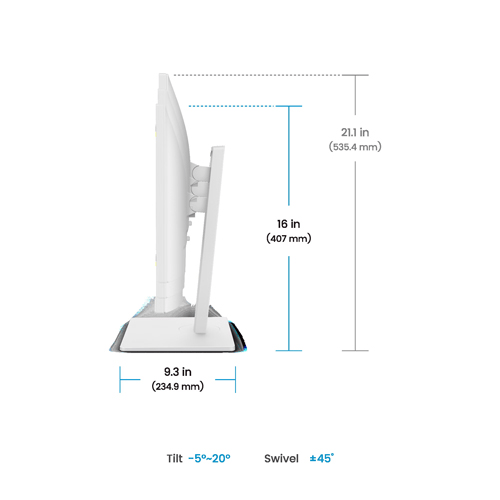
- Height adjustment: Up to 130mm for a more suitable viewing height.
- Tilt adjustment: From -5° to +20° to adjust the viewing angle.
- Swivel adjustment: 45° left and 45° right for flexible positioning.
- Pivot adjustment: 90° rotation for portrait-oriented work, including coding and long documents.
- VESA mounting: A 100 × 100mm mounting pattern supports compatible monitor arms and wall mounts.
The combination of height, tilt, swivel and pivot adjustment makes the monitor suitable for home offices, shared workstations and multi-display desks.
Designed for Coding and Productivity
The GW2786TC includes a Coding picture mode intended for programming and text-focused work. Its 27-inch screen offers room for code editors, terminals, documentation and browser windows, while the portrait pivot can be useful for viewing long files.
USB-C connectivity, laptop charging and daisy-chain support can help create a cleaner multi-display workstation for developers and professionals who regularly work across several applications.
BenQ GW2786TC Specifications
| Display | |
|---|---|
| Model | BenQ GW2786TC |
| Screen Size | 27 inches |
| Panel Type | IPS, LED backlight |
| Resolution | 1920 × 1080 (Full HD) |
| Aspect Ratio | 16:9 |
| Refresh Rate | 100Hz |
| Response Time | 5ms GtG |
| Brightness | 250 nits (typical) |
| Native Contrast Ratio | 1300:1 |
| Viewing Angles | 178° horizontal / 178° vertical |
| Colour Gamut | 99% sRGB |
| Display Colours | 16.7 million |
| Pixel Density | 82 PPI |
| Screen Coating | Matte |
| HDCP | 1.4 |
| Connectivity and Audio | |
| HDMI | 1 × HDMI 1.4 |
| DisplayPort Input | 1 × DisplayPort 1.2 |
| DisplayPort Output | Yes, MST daisy chaining |
| USB-C | 1 × USB-C with 65W Power Delivery, DisplayPort Alt Mode and data transfer |
| USB-A Downstream | 2 × USB 3.2 Gen 1, up to 5Gbps, 4.5W charging per port |
| Built-In Speakers | 2W × 2 |
| Microphone | Noise-cancellation microphone; operates with a PC connected via USB-C |
| Headphone Jack | Yes |
| Eye Care and Software | |
| Eye-Care Features | Brightness Intelligence Gen2, Low Blue Light Plus, Flicker-Free, Color Weakness and ePaper mode |
| Software | Eye-CareU, Display Quickit |
| Picture Modes | Care, Coding, Color Weakness, ECO, ePaper, Game, Low Blue Light Plus, M-book, Movie, sRGB, Standard and User |
| Environmental Standards | ENERGY STAR 8.0, TCO Certified 9.0, EPEAT Bronze |
| Certifications | TÜV Eye Comfort, Eyesafe 2.0, Flicker-Free and Low Blue Light |
| Ergonomics and Dimensions | |
| Tilt Adjustment | -5° to +20° |
| Swivel | 45° left / 45° right |
| Pivot | 90° |
| Height Adjustment | 130mm |
| Dimensions with Stand (H × W × D) | 535.4 × 612.3 × 234.9mm (landscape position) |
| Dimensions without Base (H × W × D) | 371.8 × 612.3 × 56.1mm |
| Net Weight | 7.9kg |
| Weight without Base | 4.9kg |
| VESA Mount | 100 × 100mm |
| Power | |
| Power Supply | Built-in |
| Voltage Rating | 100–240V |
| Normal Power Consumption | 17.3W |
| Maximum Power Consumption | 120W |
| Sleep Mode Power | Less than 0.5W |
| Included Accessories | |
| Documentation | Quick Start Guide, warranty card and safety instructions |
| Cables | HDMI 1.4 cable and USB-C cable; contents may vary by region |
Specifications are based on BenQ's published GW2786TC product information. Power consumption, included accessories and regional packaging may vary. USB-C charging, MST daisy chaining and microphone functionality depend on the connected equipment and configuration.
Who Should Buy the BenQ GW2786TC?
- Office professionals: A practical display for documents, spreadsheets, presentations and business applications.
- Programmers and developers: Coding Mode, portrait pivot and multi-monitor support help organise development workflows.
- Remote workers: USB-C connectivity, laptop charging, speakers and a noise-cancellation microphone simplify desk setups.
- Students: A spacious screen for online classes, research, assignments and everyday learning.
- Multitaskers: DisplayPort daisy chaining supports compatible multi-monitor configurations.
- Home-office users: Ergonomic adjustment and Eye-Care features support flexible daily work.
Things to Know Before Buying
- The native resolution is Full HD (1920 × 1080), not QHD or 4K.
- At 27 inches, Full HD provides a larger viewing area but lower pixel density than a 27-inch QHD monitor.
- USB-C Power Delivery supports up to 65W; confirm that this is sufficient for your laptop's charging requirements.
- The noise-cancellation microphone requires a USB-C connection to a compatible computer.
- DisplayPort daisy chaining requires compatible source hardware, supported operating-system features and appropriate cables.
- For colour-critical professional work, check the colour-accuracy and calibration requirements of your workflow.
Frequently Asked Questions
1. What is the resolution of the BenQ GW2786TC?
The GW2786TC features a 27-inch IPS panel with a Full HD resolution of 1920 × 1080 pixels.
2. Does the BenQ GW2786TC support 100Hz?
Yes. It supports a refresh rate of up to 100Hz, subject to the connected device, cable and display configuration.
3. Can I charge my laptop through USB-C?
Yes. The USB-C connection supports up to 65W Power Delivery alongside compatible video and data functions. Check your laptop's power requirements to confirm compatibility.
4. Does the GW2786TC support multiple monitors?
Yes. Its DisplayPort output supports MST daisy chaining with compatible computers and monitors. Mac users may require a compatible Thunderbolt-based solution or docking station.
5. Does this monitor include a microphone and speakers?
Yes. It includes two 2W speakers and a noise-cancellation microphone. The microphone operates with compatible computers connected through USB-C.
6. Is the BenQ GW2786TC suitable for coding?
Yes. Coding Mode, the adjustable stand, portrait pivot and compatible multi-monitor support make it suitable for programming and text-heavy workflows.
7. Can the GW2786TC be mounted on a monitor arm?
Yes. It supports a 100 × 100mm VESA mounting pattern for compatible monitor arms and wall mounts.
Build Your Next Gaming PC
Find the essential components for your next PC build with Clarion Computers. Explore quality components to create a setup that matches your performance goals and budget.